مرحباً بك في BKPOWER!












ما هو UPS في نظام الكمبيوتر؟
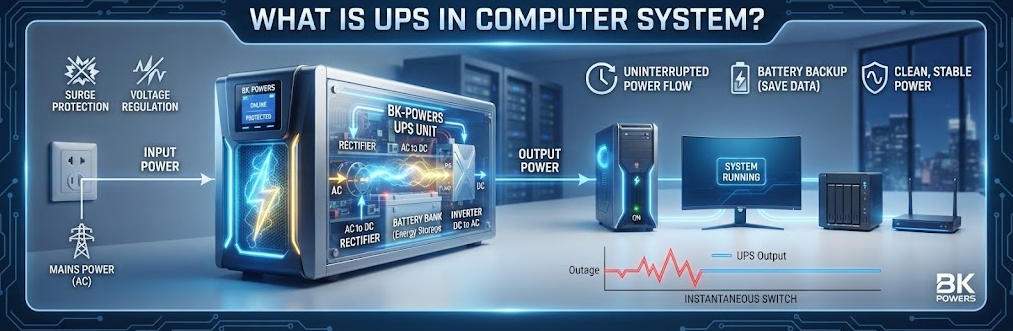
نصائح: توفر وحدة إمداد الطاقة غير المنقطعة (UPS) في نظام الكمبيوتر طاقة احتياطية عند انقطاع التيار الكهربائي. وهي تحمي أجهزة الكمبيوتر المكتبية والخوادم ومحطات العمل من فقدان البيانات. يشرح هذا الدليل أنماط توصيل وحدات UPS وطرق تحديد حجمها وخيارات البطاريات الاحتياطية.
Ⅰ. ما هو نظام الإمداد بالطاقة غير المنقطعة (UPS) في أنظمة الحاسوب؟
1. التعريف المباشر
يُعد جهاز UPS في نظام الكمبيوتر جهازًا كهربائيًّا. وهو يوفر طاقة احتياطية لأجهزة الحوسبة. ويتم تشغيله عند انقطاع التيار الكهربائي أو عندما يصبح غير مستقر.
2. لماذا تحتاج أجهزة الكمبيوتر إلى وحدة إمداد الطاقة غير المنقطعة (UPS)؟
تقوم أجهزة الكمبيوتر بمعالجة البيانات في الذاكرة المتطايرة. ويؤدي انقطاع التيار الكهربائي المفاجئ إلى فقدان الأعمال التي لم يتم حفظها. كما أنه يتسبب في تلف أنظمة الملفات وإلحاق الضرر بالأجهزة. ويقوم جهاز UPS بسد الفجوة الناتجة عن انقطاع التيار الكهربائي. كما يتيح إيقاف التشغيل الآمن ويحمي من الاضطرابات الكهربائية.
يُعرّف المعهد الوطني للمعايير والتقنية (NIST) جهاز UPS بأنه نظام يوفر طاقة بديلة عند انقطاع التيار الكهربائي من المصدر الأساسي. وتصنف جمعية مهندسي الكهرباء والإلكترونيات (IEEE) أنظمة UPS على أنها بنية تحتية حيوية لحماية الطاقة في مراكز البيانات وقطاع الرعاية الصحية وأنظمة التحكم الصناعية. وتؤكد هذه المعايير أن جهاز UPS ليس مجرد بطارية، بل هو منصة شاملة لإدارة الطاقة.
Ⅱ. كيفية عمل وحدة إمداد الطاقة غير المنقطعة (UPS) في نظام الكمبيوتر
1. وضع التشغيل العادي
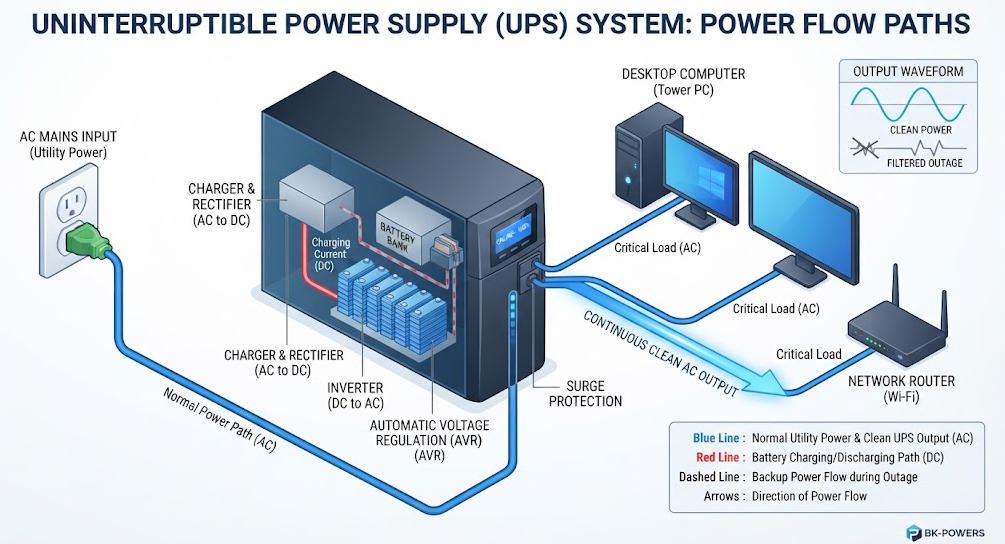
في الظروف العادية، يقوم جهاز UPS بمراقبة التيار المتردد الوارد. واعتمادًا على بنية الشبكة، قد يقوم بتوصيل التيار الكهربائي من شبكة الكهرباء العامة مباشرةً إلى الكمبيوتر. كما قد يقوم بتحويل التيار عبر المقومات والمحولات. وتستمر البطارية في الشحن خلال هذه المرحلة.
يقوم المقوم بتحويل التيار المتردد الوارد إلى تيار مستمر. ويغذي هذا الخط الكهربائي للتيار المستمر العاكس، كما يحافظ على شحن البطارية عند مستواه الأقصى. ثم يقوم العاكس بتحويل التيار المستمر مرة أخرى إلى تيار متردد نقي. ويحدد مسار التحويل المزدوج هذا UPS عبر الإنترنت العمارة.
2. الاستجابة لانقطاع التيار الكهربائي
عندما يكتشف جهاز UPS انقطاع التيار الكهربائي، يستجيب نظام التحكم الخاص به على الفور. وتعتمد طبيعة الاستجابة بالضبط على بنية الشبكة.
يقوم جهاز UPS في وضع الاستعداد بنقل الحمل إلى العاكس الخاص به. ويستغرق ذلك من 2 إلى 10 مللي ثانية. أما جهاز UPS التفاعلي مع الخط، فيقوم بعملية نقل مماثلة، وتستغرق من 2 إلى 4 مللي ثانية. أما جهاز UPS ذو التحويل المزدوج المتصل بالشبكة، فلا يحتاج إلى أي عملية نقل، حيث إن العاكس يقوم بالفعل بتزويد الحمل بالطاقة.
تقوم البطارية بتزويد الناقل بالطاقة ذات التيار المستمر. ويقوم المحول بتحويل هذه الطاقة إلى تيار متردد. ويستمر الكمبيوتر في العمل دون انقطاع. وعندما تعود الطاقة من شبكة الكهرباء، يعود جهاز UPS إلى الوضع العادي. ويقوم الشاحن بإعادة شحن البطارية.
3. حماية جودة الطاقة
لا يقتصر دور وحدة إمداد الطاقة (UPS) على حماية أجهزة الكمبيوتر من انقطاع التيار الكهربائي فحسب، بل إنها تحميها أيضًا من انخفاضات الجهد الكهربائي، والارتفاعات المفاجئة في الجهد، والضوضاء الكهربائية.
تستخدم أنظمة UPS التفاعلية مع الشبكة ميزة التنظيم التلقائي للجهد الكهربائي. فهي تعمل على تصحيح انخفاض الجهد وارتفاعه دون استنزاف البطارية. أما أنظمة UPS المتصلة بالشبكة، فتقوم بتجديد الطاقة الناتجة بشكل مستمر. كما أنها تعزل أجهزة الكمبيوتر عن جميع الاضطرابات التي تطرأ على الشبكة الكهربائية.
تختلف متطلبات جودة الطاقة باختلاف خصائص الحمل. تتطلب الخوادم حدودًا صارمة للتشويه التوافقي الكلي (THD) تقل عن 5 في المائة. أما أجهزة الكمبيوتر المخصصة للألعاب، فتحتاج إلى جهد كهربائي مستقر لتشغيل وحدات معالجة الرسومات (GPU) عالية الاستهلاك للطاقة. في حين تتحمل أجهزة الكمبيوتر المكتبية المخصصة للأعمال تقلبات معتدلة. ويجب أن تتوافق بنية وحدة إمداد الطاقة غير المنقطعة (UPS) مع الاستخدام المقصود.
Ⅲ. أنماط توصيل وحدات الإمداد بالطاقة (UPS) في أنظمة الحاسوب
1. وحدة إمداد الطاقة غير المنقطعة (UPS) الاحتياطية (غير المتصلة بالشبكة)
عادةً ما يقوم جهاز UPS في وضع الاستعداد بتزويد الكمبيوتر بالطاقة من شبكة الكهرباء. ويبقى العاكس في وضع السكون. وتتم شحن البطارية بشحن بطيء أثناء التشغيل العادي.
عند انقطاع التيار الكهربائي، يقوم مرحل بتحويل الحمل إلى العاكس. ويستغرق هذا التحويل من 2 إلى 10 مللي ثانية. وتناسب هذه البنية أجهزة الكمبيوتر المنزلية الأساسية. كما أنها لا توفر أي تنظيم للجهد أثناء التشغيل العادي.
تبلغ كفاءة وحدات الاستعداد ما بين 95 و98 في المائة. وتكلفتها أقل من الأنواع الأخرى. ومع ذلك، فإنها توفر الحد الأدنى من معالجة التيار الكهربائي. وقد تتعرض الأجهزة الحساسة لانقطاعات قصيرة في التيار.
تتراوح سعة هذه الوحدات عادةً بين 400 و1000 فولت-أمبير. وهي توفر الحماية لأجهزة الكمبيوتر المكتبية الفردية وأجهزة التوجيه. لا تستخدمها مع الخوادم أو أجهزة الكمبيوتر المخصصة للألعاب المزودة بمصادر طاقة مزودة بتقنية PFC نشطة.
2. خط UPS تفاعلي UPS
يضيف جهاز UPS التفاعلي مع الشبكة ميزة التشغيل التلقائي منظم الجهد. ويستخدم محولًا متعدد النقاط. ويقوم جهاز AVR بتصحيح حالات انخفاض الجهد وارتفاع الجهد.
عند انقطاع التيار الكهربائي، يتولى العاكس تحمل الحمل. ويتراوح زمن التحويل بين 2 و4 مللي ثانية. وتحقق هذه البنية التوازن بين الحماية والتكلفة. وتصل الكفاءة عادةً إلى ما بين 90 و96 في المائة.
تُعد أنظمة UPS التفاعلية مع الخط مناسبة للمكاتب الصغيرة. فهي تحمي معدات الشبكة ومحطات العمل. ولا تعمل على عزل الأحمال عن الشبكة الكهربائية. كما أن انحراف التردد والضوضاء الشديدة تمر عبرها.
يختار معظم مستخدمي أجهزة الكمبيوتر هذه البنية الشبكية. فهي تتعامل مع تقلبات الجهد الكهربائي الشائعة في المناطق السكنية. كما أنها توفر ما يكفي من وقت النسخ الاحتياطي لضمان إيقاف التشغيل الآمن. وتتراوح سعة الطرازات بين 600 فولت-أمبير و3000 فولت-أمبير.
3. التحويل المزدوج عبر الإنترنت UPS
يقوم جهاز UPS المتصل بالإنترنت بتحويل التيار المتردد إلى تيار مستمر ثم إعادته إلى تيار متردد بشكل مستمر. ويقوم المقوم بشحن البطارية، بينما يقوم العاكس بتزويد الحمل بالطاقة في جميع الأوقات.
توفر هذه البنية وقت انتقال صفري. كما توفر عزلًا تامًا عن الاضطرابات في الشبكة. ويبقى تنظيم الجهد ضمن نطاق ±1 في المائة. ويظل التشوه التوافقي الكلي (THD) للإخراج أقل من 3 في المائة.
تُعد أنظمة UPS عبر الإنترنت مناسبة للخوادم الحيوية. فهي تحمي معدات مراكز البيانات. كما أنها تُستخدم مع أجهزة الكمبيوتر الطبية والصناعية. لكن ذلك يأتي مقابل تكلفة أعلى وكفاءة أقل قليلاً.
تساهم التصميمات الحديثة التي لا تعتمد على المحولات في تحسين الكفاءة. تصل كفاءة بعض الوحدات إلى ما بين 96 و99 في المائة في الوضع الاقتصادي. وتستخدم هذه الوحدات تقنية IGBT أو SiC MOSFET. وتؤدي هذه التطورات إلى خفض تكاليف التشغيل في حالات النشر على نطاق واسع.
4. التصنيف وفقًا للمعيار IEC 62040-3
يصنف المعيار IEC 62040-3 أنظمة UPS حسب مدى اعتمادها على الجهد والتردد. ويساعد هذا المعيار المهندسين على اختيار البنية المناسبة.
يُقصد بـ «VFD» «يعتمد على الجهد والتردد». وتندرج أجهزة UPS الاحتياطية ضمن هذه الفئة. ويُقصد بـ «VI» «مستقل عن الجهد». وتندرج أجهزة UPS التفاعلية مع الشبكة ضمن هذه الفئة. ويُقصد بـ «VFI» «مستقل عن الجهد والتردد». وتندرج أجهزة UPS ذات التحويل المزدوج المتصلة بالشبكة ضمن هذه الفئة.
توفر أنظمة VFI أعلى مستوى من الحماية. فهي تعمل على إعادة توليد جهد الخرج والتردد بشكل مستقل. وهذا يجعلها مثالية لأنظمة الكمبيوتر ذات المهام الحيوية.
5. مقارنة بين أنماط الشبكات الحاسوبية
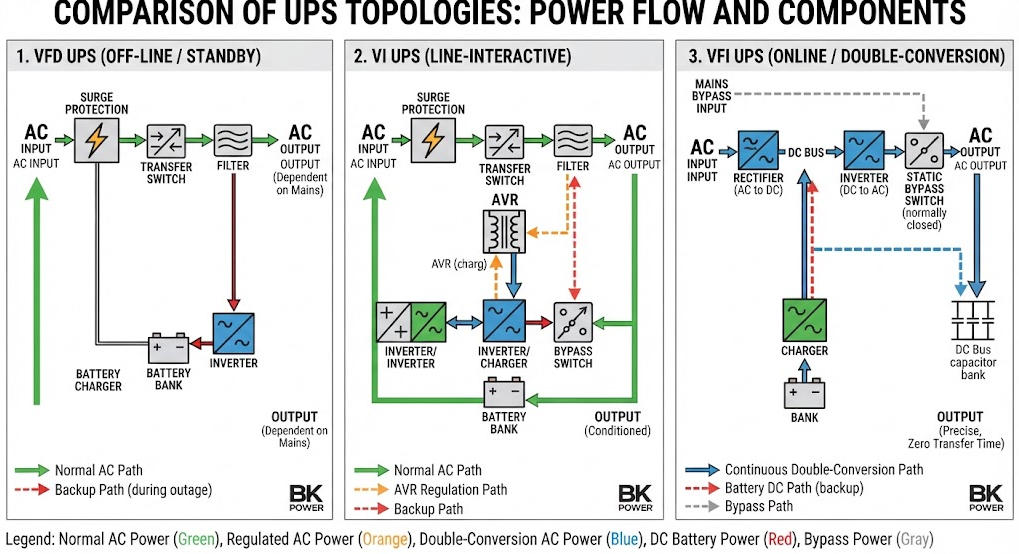
| الميزة | وضع الاستعداد (VFD) | التفاعل المباشر (VI) | التحويل المزدوج عبر الإنترنت (VFI) |
|---|---|---|---|
| مسار الطاقة العادي | الخدمات المباشرة | وحدة كهربائية مزودة بجهاز تنظيم الجهد التلقائي (AVR) | العاكس دائمًا |
| وقت التحويل | 2-10 مللي ثانية | 2-4 مللي ثانية | 0 مللي ثانية |
| تنظيم الجهد الكهربائي | لا يوجد | نطاق محدود | مستمر، ±1% |
| تكييف الطاقة | الأساسيات | معتدل | العزل التام |
| الكفاءة النموذجية | 95–98% | 90–96% | 90–96% (بالوحدات الحديثة) |
| ناتج THD | معتدل | معتدل | <3% |
| الأفضل لـ | أجهزة الكمبيوتر المنزلية، وأجهزة التوجيه | محطات العمل المكتبية | الخوادم، أجهزة الألعاب |
| التكلفة النسبية | الأدنى | معتدل | الأعلى |
هذه المقارنة نظرية. ويختلف الأداء الفعلي باختلاف الشركة المصنعة. يجب دائمًا التحقق من المواصفات بالرجوع إلى تقارير الاختبار وفقًا للمعيار IEC 62040-3.
Ⅳ. المكونات الرئيسية لنظام إمداد الطاقة غير المنقطع (UPS) الخاص بالكمبيوتر
1. المقوم والشاحن
يقوم المقوم بتحويل التيار المتردد الوارد إلى تيار مستمر. ويقوم بتزويد ناقل التيار المستمر بالطاقة أثناء التشغيل العادي. كما يقوم بشحن البطارية. وتستخدم المقومات الحديثة معامل القدرة تصحيح. وهذا يقلل من التشويه التوافقي على جانب الإدخال.
2. نظام البطارية
تخزن البطارية الطاقة تحسبًا لانقطاع التيار الكهربائي. ولا تزال بطاريات الرصاص الحمضية (VRLA) شائعة الاستخدام. وتدوم هذه البطاريات من 3 إلى 5 سنوات في الظروف العادية. أما بطاريات الليثيوم أيون، فهي تكتسب حصة متزايدة في السوق، وتدوم من 8 إلى 15 سنة.
يعتمد اختيار البطارية على عدة عوامل. ومن بينها مدة التشغيل المطلوبة، ومعدل التفريغ، ودرجة الحرارة المحيطة، واستراتيجية الصيانة. وتتميز بطاريات الليثيوم أيون بكثافة طاقة أعلى. كما أنها تتحمل نطاقات درجات حرارة أوسع.
3. العاكس
يقوم العاكس بتحويل التيار المستمر إلى تيار متردد. وهو الذي يحدد جهد الخرج وتردده وجودة شكل الموجة. وتنتج العواكس عالية الجودة موجة جيبية نقية. وهذا أمر ضروري لمصادر الطاقة المزودة بتقنية تصحيح عامل القدرة (PFC) النشطة.
تستخدم محولات التيار ذات الموجة الجيبية المحاكاة تقريبات متدرجة. وقد تتسبب في انقطاع التيار أو ارتفاع درجة الحرارة في أجهزة الكمبيوتر الحساسة. وتتطلب معظم أجهزة الكمبيوتر المكتبية الحديثة وجميع الخوادم موجة جيبية نقية.
4. مفتاح التجاوز الثابت
يوفر الممر الجانبي الثابت مسارًا بديلاً للطاقة. ويتم تفعيله أثناء حدوث أعطال في وحدة إمداد الطاقة غير المنقطعة (UPS) أو في حالات الحمل الزائد. كما يتيح إجراء أعمال الصيانة دون مقاطعة التيار الموجه إلى الحمل. ويُعد هذا المكون عنصرًا حاسمًا لضمان توفر الخدمة في مراكز البيانات.
5. نظام التحكم والمراقبة
تشتمل وحدات UPS الحديثة على أنظمة تحكم رقمية. فهي تراقب جهد الدخل وجهد الخرج ومستوى الحمل وحالة البطارية. كما أنها توفر منافذ اتصال. وتتيح منافذ USB وRS-232 وSNMP المراقبة عن بُعد.
Ⅴ. تحليل أحمال الكمبيوتر وتحديد سعة وحدات إمداد الطاقة غير المنقطعة (UPS)
1. الاستهلاك النموذجي للطاقة حسب نوع الكمبيوتر
يبدأ تحديد الحجم الدقيق بجرد الأحمال. قم بقياس كل جهاز متصل بوحدة إمداد الطاقة غير المنقطعة (UPS).
تستهلك أجهزة الكمبيوتر المكتبية ما بين 80 و200 واط. أما أجهزة الكمبيوتر المخصصة للألعاب فتستهلك ما بين 250 و450 واط. أما أجهزة الكمبيوتر المتكاملة فتستهلك ما بين 50 إلى 120 واط. وتستهلك الشاشات ما بين 25 إلى 80 واط حسب حجمها. وتستهلك أجهزة توجيه شبكات الواي فاي ما بين 10 إلى 25 واط. وتستهلك أجهزة التخزين الشبكي (NAS) ما بين 20 إلى 60 واط.
احرص دائمًا على مراجعة القيم المحددة في لوحة البيانات. فهذه القيم تشير إلى الحد الأقصى المحتمل للاستهلاك. وعادةً ما يكون الاستهلاك الفعلي أقل من ذلك. استخدم مقياس طاقة قابل للتوصيل بالكهرباء للحصول على قياس دقيق.
2. التيار الفعال (VA) مقابل الواط ومعامل القدرة
تحتوي أنظمة UPS على تصنيفين. تُقاس الطاقة الظاهرية بوحدة VA، بينما تُقاس الطاقة الفعلية بالواط. وترتبط هاتان القيمتان بمعامل القدرة.
الصيغة بسيطة. تبلغ القوة الفعالة (VA) الناتج عن قسمة الوات على معامل القدرة. تصل معاملات القدرة في وحدات تزويد الطاقة الحديثة للكمبيوترات إلى ما بين 0.90 و0.99. أما المعدات القديمة، فقد تصل معاملات القدرة فيها إلى 0.70.
يجب أن يستوفي جهاز UPS كلا المعيارين. يمكن أن يتجاوز الحمل القيمة المقننة بالواط مع البقاء دون الحد الأقصى المقنن بالفا. ويجب على المهندسين التحقق من كلتا القيمتين عند اختيار الجهاز.
3. منهجية تحديد المقاسات
اتبع هذه الخطوات لتحديد سعة وحدة إمداد الطاقة غير المنقطعة (UPS) لأجهزة الكمبيوتر. أولاً، قم بجرد جميع الأجهزة التي ستتم حمايتها. سجل القوة الكهربائية لكل جهاز. احسب إجمالي الحمل بالواط.
ثانيًا، قم بتحويل الواط إلى فولت-أمبير (VA). اقسم إجمالي الواط على معامل القدرة للحمل. استخدم القيمة 0.90 للمعدات الحديثة إذا كان المعامل غير معروف.
ثالثًا، ضع هامشًا للنمو. أضف نسبة تتراوح بين 20 و25 في المائة استعدادًا للتوسع المستقبلي.
رابعًا، يجب تطبيق هامش تحميل. يجب أن يتم التصميم على أساس 70 إلى 80 في المائة من السعة المقدرة لوحدة إمداد الطاقة غير المنقطعة (UPS). وهذا يوفر هامشًا احتياطيًا لتدفقات التيار الأولية.
خامساً، حدد المعيار التالي حجم UPS. تحقق من قيم كل من التيار (VA) والقدرة (واط) مقارنةً بالحمل الذي قمت بحسابه.
4. مثال على ورقة عمل تحديد المقاسات
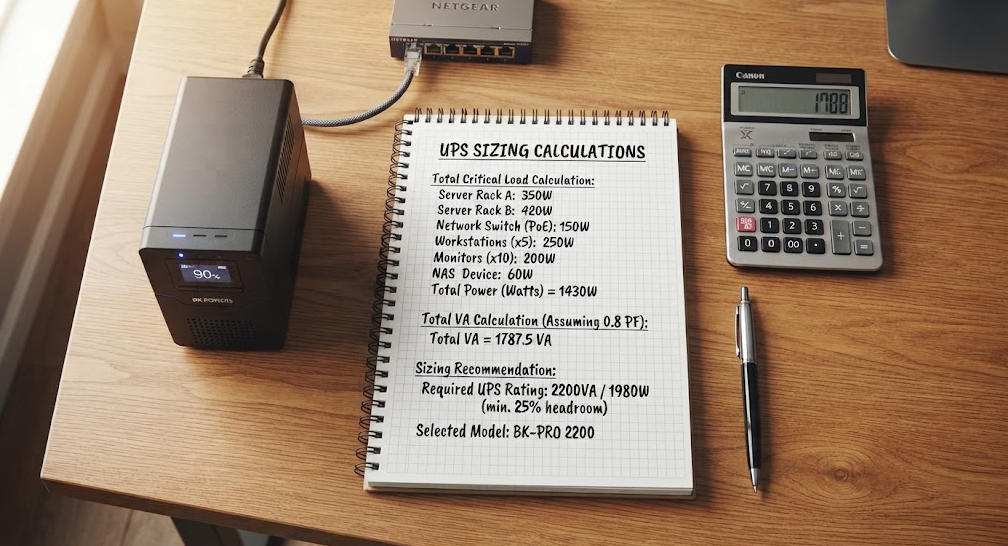
| الجهاز | الكمية | واط لكل وحدة | إجمالي الوات |
|---|---|---|---|
| كمبيوتر مكتبي (للاستخدام المكتبي) | 1 | 150 | 150 |
| شاشة LED مقاس 24 بوصة | 2 | 35 | 70 |
| جهاز توجيه واي فاي | 1 | 15 | 15 |
| محرك أقراص صلب خارجي | 1 | 10 | 10 |
| المجموع الفرعي | 245 | ||
| تعديل معامل القدرة (÷0.9) | 272 فولت-أمبير | ||
| هامش النمو (+25%) | 340 فولت أمبير | ||
| أجهزة UPS الموصى بها | 600 فولت-أمبير / 360 واط كحد أدنى |
يوضح هذا المثال الطريقة المتبعة. وتعتمد المتطلبات الفعلية على المعدات المستخدمة.
Ⅵ. تكنولوجيا البطاريات ومدة التشغيل
1. بطاريات VRLA مقابل بطاريات الليثيوم أيون
تتميز بطاريات الرصاص الحمضية من نوع VRLA بتكلفتها الأولية المنخفضة. وتدوم من 3 إلى 5 سنوات. كما أنها حساسة لدرجات الحرارة التي تزيد عن 30 درجة مئوية.
تتميز بطاريات الليثيوم-أيون بكثافة طاقة أعلى. وتدوم من 8 إلى 15 عامًا. كما أنها تشحن بسرعة أكبر وتتحمل نطاقات درجات حرارة أوسع. وتبلغ تكلفتها الأولية ما بين ضعفين إلى ثلاثة أضعاف. ومع ذلك، غالبًا ما تكون التكلفة الإجمالية للملكية في صالح بطاريات الليثيوم-أيون في حالات الاستخدام طويل الأمد.
2. حساب وقت التشغيل
يعتمد وقت التشغيل على سعة البطارية والحمل. توفر الصيغة الأساسية تقديرًا نظريًّا. اضرب جهد البطارية في الأمبير-ساعة. ثم اضرب الناتج في كفاءة وحدة الإمداد غير المنقطع (UPS). اقسم الناتج على طاقة الحمل.
يختلف وقت التشغيل الفعلي عن الوقت النظري. سعة البطارية تنخفض عند معدلات التفريغ العالية. تؤثر درجة الحرارة على معدلات التفاعلات الكيميائية. ويؤدي التقادم إلى انخفاض السعة المتاحة بمرور الوقت.
تنشر الشركات المصنعة جداول تفريغ الطاقة الثابتة. وينبغي على المهندسين استخدامها في الاختيار النهائي. أما الصيغة النظرية فهي تقتصر على التقديرات الأولية فقط.
3. مقارنة بين تقنيات البطاريات
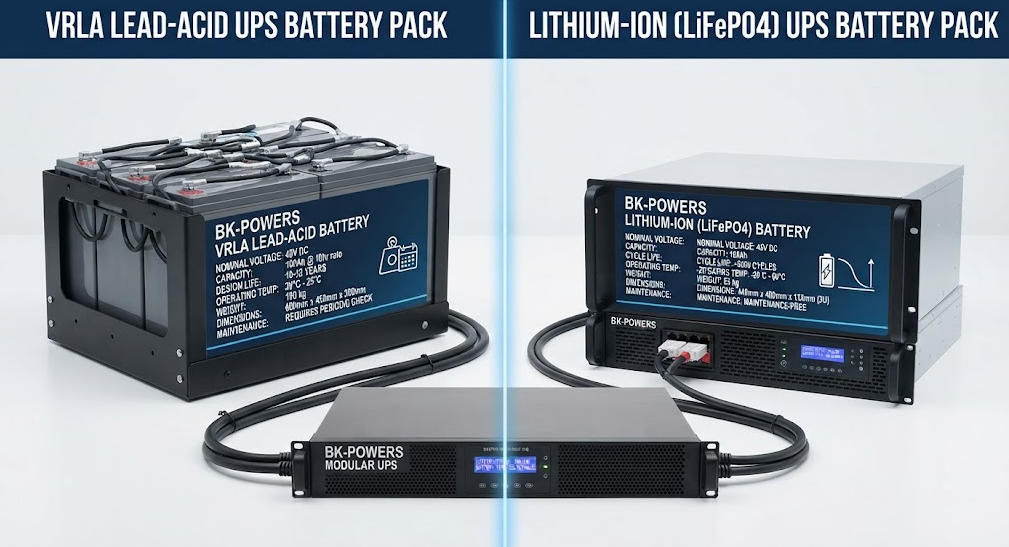
| المعلمة | حمض الرصاص الحامضي VRLA | ليثيوم أيون |
|---|---|---|
| العمر الافتراضي المعتاد | 3-5 سنوات | 8-15 سنة |
| كثافة الطاقة | أقل | أعلى بثلاثة أضعاف |
| مدة الشحن | 4–8 ساعات | 1-3 ساعات |
| حساسية درجة الحرارة | أعلى من 30 درجة مئوية | معتدل |
| عمق التفريغ | 50–80% | 80–95% |
| التكلفة الأولية | أقل | أعلى بمقدار 2–3 أضعاف |
| الصيانة | الفحص الدوري | الحد الأدنى |
| الأفضل لـ | النسخ الاحتياطي قصير الأجل، الميزانية | عمر بطارية طويل، إعدادات متميزة |
Ⅶ. شكل موجة الإخراج والتوافق مع أجهزة الكمبيوتر
1. الموجة الجيبية النقية مقابل الموجة الجيبية المحاكاة
تنتج محولات UPS نواتج مختلفة الأشكال الموجية. تتطابق الموجة الجيبية النقية تمامًا مع التيار الكهربائي المقدم من شبكة الكهرباء. أما الموجة الجيبية المحاكاة فتستخدم تقريبات متدرجة.
تستخدم أجهزة الكمبيوتر الحديثة وحدات تزويد طاقة مزودة بتقنية PFC النشطة. وتتطلب هذه الوحدات مدخلات ذات موجة جيبية نقية. وقد تؤدي الموجة المحاكاة إلى انقطاع التشغيل. كما قد تتسبب في ارتفاع درجة الحرارة أو صدور ضوضاء غير طبيعية من المروحة.
تُعتبر شركة إيتون أن الموجة الجيبية النقية أمرٌ ضروري للخوادم المزودة بوظيفة تصحيح عامل القدرة (PFC). حيث يُحافظ الشكل السلس للموجة على انخفاض التشويه التوافقي إلى أقل من 5 في المائة. أما الموجات المحاكاة فتشكل مخاطر تتعلق بالتوافق مع الأجهزة الإلكترونية الحساسة.
2. التوافق حسب نوع الكمبيوتر
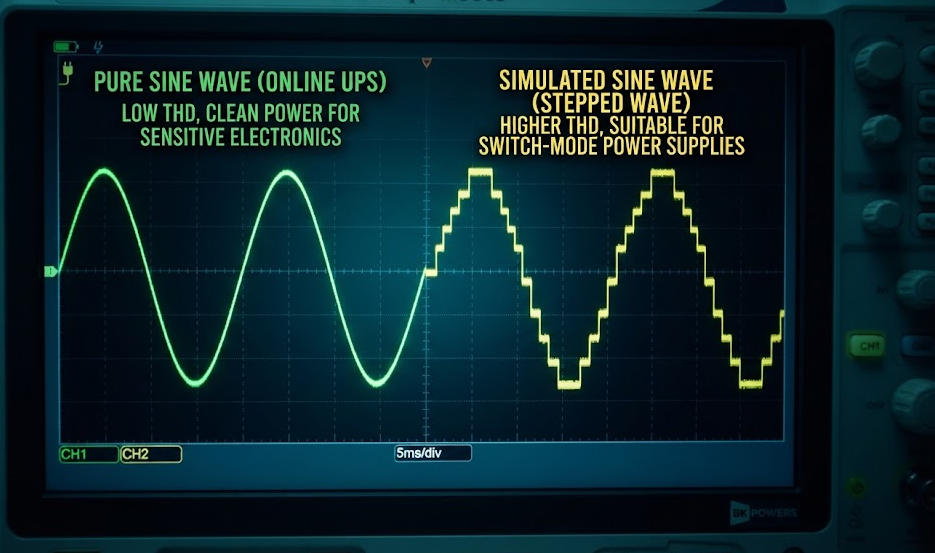
تتناسب أنظمة UPS ذات الموجة الجيبية النقية مع جميع أنواع أجهزة الكمبيوتر. فهي تعمل مع أجهزة الكمبيوتر المخصصة للألعاب ومحطات العمل والخوادم. كما أنها تقضي على التداخل الكهرومغناطيسي الذي يؤدي إلى إتلاف عمليات نقل البيانات.
تكفي وحدات الموجة الجيبية المحاكاة لأجهزة التوجيه الأساسية. كما أنها تزود أجهزة الكمبيوتر المكتبية غير المزودة بتقنية PFC بالطاقة. ومع ذلك، فإنها تنطوي على خطر إتلاف وحدات تزويد الطاقة المزودة بتقنية PFC النشطة. وقد تقلص الفارق في الأسعار. وينبغي على معظم مستخدمي الكمبيوتر اختيار الموجة الجيبية النقية.
تحتاج أجهزة الكمبيوتر المخصصة للألعاب المزودة بوحدات معالجة رسومات (GPU) عالية الطاقة إلى موجة جيبية نقية. حيث يستهلك مزود الطاقة تيارًا أوليًا عاليًا. ولا يمكن للموجات المحاكاة تلبية هذا الطلب.
Ⅷ. وحدة إمداد الطاقة (UPS) مقابل مثبت الجهد في أنظمة الكمبيوتر
1. الاختلافات الجوهرية
يوفر جهاز UPS الطاقة الاحتياطية أثناء انقطاع التيار الكهربائي. الجهد مُثبِّت يقتصر دوره على تنظيم الجهد الكهربائي فقط. ولا يمكنه تزويد الأجهزة بالطاقة أثناء انقطاع التيار الكهربائي.
قد تشتمل وحدة UPS على ميزة تنظيم الجهد. وتعتمد هذه الإمكانية على بنية النظام. وتوفر الوحدات التفاعلية مع الخط والوحدات المتصلة بالشبكة هذه الوظيفة، بينما لا توفرها الوحدات الاحتياطية.
2. متى يستخدم كل جهاز
تحتاج أجهزة الكمبيوتر الموجودة في المناطق التي تتكرر فيها انقطاعات التيار الكهربائي إلى وحدة إمداد الطاقة غير المنقطعة (UPS). حيث تمنع الطاقة الاحتياطية فقدان البيانات، كما تتيح إيقاف تشغيل الجهاز بأمان.
قد تحتاج أجهزة الكمبيوتر الموجودة في المناطق التي تتمتع بإمدادات كهربائية مستقرة ولكنها تعاني من تقلبات شديدة في الجهد الكهربائي إلى جهاز تثبيت الجهد. ومع ذلك، يستفيد معظم المستخدمين بشكل أكبر من استخدام وحدة إمداد الطاقة غير المنقطعة (UPS). فوظيفة الدعم الاحتياطي تعالج المخاطر الأكثر خطورة.
تستخدم بعض المنشآت كلا الجهازين. حيث يتم تركيب المُثبِّت في الجزء الأول من الدائرة، بينما يتم تركيب وحدة الإمداد بالطاقة غير المنقطعة (UPS) في الجزء التالي من الدائرة. وهذا يطيل بطارية UPS الحياة من خلال تقليل الإجهاد الناتج عن الجهد الكهربائي.
Ⅸ. اختيار وحدة إمداد الطاقة غير المنقطعة (UPS) المناسبة لنظام الكمبيوتر الخاص بك
1. أجهزة الكمبيوتر المنزلية والمكتبية
تستهلك أجهزة المكاتب المنزلية عادةً ما بين 200 و400 واط. ويُعد جهاز UPS التفاعلي (line-interactive) بسعة تتراوح بين 600 و1000 فولت-أمبير مناسبًا لمعظم المستخدمين. ويوفر هذا الجهاز مدة تشغيل تتراوح بين 10 و30 دقيقة.
اختر مخرجًا بموجة جيبية نقية لأجهزة الكمبيوتر المكتبية الحديثة. تأكد من أن وحدة إمداد الطاقة غير المنقطعة (UPS) تحتوي على عدد كافٍ من المنافذ المدعومة بالبطارية. قم بتوصيل الشاشات وأجهزة التوجيه بالمنافذ المحمية. اترك الطابعات الليزرية موصولة بمنافذ مخصصة لحماية التيار الزائد فقط.
2. أجهزة الكمبيوتر المخصصة للألعاب ومحطات العمل
تتطلب أجهزة الكمبيوتر المخصصة للألعاب مزيدًا من الطاقة. تستهلك الأجهزة من الفئة المتوسطة ما بين 400 و550 واط. أما الأجهزة المتطورة فقد تتجاوز استهلاكها 600 واط.
اختر وحدة إمداد الطاقة غير المنقطعة (UPS) من النوع التفاعلي مع الخط أو المتصل بالشبكة، بسعة تتراوح بين 1000 و1500 فولت-أمبير. ويجب أن تكون الموجة الجيبية نقية في حالة استخدام مزودات الطاقة المزودة بتقنية تصحيح عامل القدرة (PFC) النشطة. وقد تنخفض مدة التشغيل عند الحمل الكامل إلى ما بين 5 و15 دقيقة.
3. الخوادم ومعدات مراكز البيانات
تتطلب الخوادم أنظمة UPS ذات تحويل مزدوج متصلة بالإنترنت. توفر هذه الوحدات عزلًا تامًا، كما توفر تنظيمًا دقيقًا للجهد الكهربائي.
حدد سعة وحدة إمداد الطاقة غير المنقطعة (UPS) باستخدام القيم المقدرة بالكيلوواط (kW) والكيلوفولتمبير (kVA). طبق نظام التكرار N+1 للتطبيقات الحيوية. قم بمواءمة مدة التشغيل مع تسلسلات تشغيل المولدات.
Ⅹ. المعايير والامتثال
1. سلسلة المعايير IEC 62040
تتناول المواصفة القياسية IEC 62040-1 متطلبات السلامة الخاصة بوحدات إمداد الطاقة غير المنقطعة (UPS). وهي تشمل معايير الوقاية من المخاطر ومعايير التصنيع. أما المواصفة القياسية IEC 62040-3 فتحدد معايير الأداء وطرق الاختبار. كما تصنف أنماط التوصيل إلى VFD أو VI أو VFI.
يضمن الامتثال للأعتمادات الأداء المُثبت. كما يضمن وقت النقل، وتنظيم الجهد الكهربائي، وحدود التشوه التوافقي الكلي (THD). وينبغي على المشترين طلب تقارير الاختبار من الشركات المصنعة.
2. معيار UL 1778 والشهادات الإقليمية
توفر المواصفة UL 1778 إطارًا للسلامة لأنظمة UPS في أمريكا الشمالية. أما علامة CE فتنطبق على الأسواق الأوروبية، وتتطلب الامتثال لتوجيه الجهد المنخفض.
احرص دائمًا على التحقق من علامات الاعتماد قبل الشراء. فقد تفتقر الأجهزة غير المعتمدة إلى الحماية المناسبة. كما أنها قد تخالف اللوائح الكهربائية المحلية.
Ⅺ. الخاتمة
تُعد وحدة إمداد الطاقة (UPS) في نظام الكمبيوتر جزءًا أساسيًّا من البنية التحتية. فهي توفر الحماية من انقطاع التيار الكهربائي، وانخفاض الجهد، وارتفاع الجهد، والتشويش الكهربائي. وتعتمد البنية المناسبة على مدى أهمية الحمل. وتُعد الوحدات الاحتياطية مناسبة للاستخدام المنزلي الأساسي. أما النماذج التفاعلية مع الخط، فهي تحقق التوازن بين التكلفة والحماية. وتُستخدم أنظمة التحويل المزدوج المتصلة بالشبكة لخدمة الخوادم ذات المهام الحيوية.
يتطلب تحديد الحجم المناسب قياسًا دقيقًا للحمل. قم بتحويل الواط إلى فولت-أمبير (VA) باستخدام معامل القدرة. ضع في الاعتبار هوامش النمو والحمل. اختر مخرجًا بموجة جيبية نقية لأجهزة الكمبيوتر الحديثة. اختر بطاريات VRLA أو بطاريات ليثيوم أيون بناءً على متطلبات مدة التشغيل والميزانية.
تعامل مع وحدة إمداد الطاقة غير المنقطعة (UPS) باعتبارها جزءًا من بنية إمداد الطاقة الأوسع نطاقًا. وقم بتنسيقها مع أنظمة الحماية من الطفرات الكهربائية، والتأريض، والمولدات الكهربائية. ويضمن هذا النهج الموثوقية على المدى الطويل لنظام الكمبيوتر الخاص بك.
مقالات وموارد ذات صلة
| العنوان | المحتوى الأساسي | عنوان URL |
|---|---|---|
| ما هي وظيفة نظام الإمداد بالطاقة غير المنقطع؟ | الوظائف العامة لأجهزة UPS ومكوناتها ومبادئ عملها لجميع التطبيقات | https://bkpowers.com/service/what-does-ups-do/ |
| أجهزة UPS لأجهزة الكمبيوتر: حماية عالمك الرقمي | أنظمة UPS المصممة خصيصًا لأنظمة الكمبيوتر وأنواعها ومعايير اختيارها | https://bkpowers.com/service/ups-for-computers-protecting-your-digital/ |
| ما هو نظام UPS وكيف يعمل؟ | دليل شامل لأنواع أجهزة UPS: أجهزة الاستعداد (Standby)، وأجهزة التفاعل مع الخط (Line-Interactive)، وأجهزة التغذية المباشرة (Online) | https://bkpowers.com/service/what-is-ups-and-how-it-works/ |
| حاسبة مدة التشغيل الاحتياطي لنظام UPS | منهجية حساب وقت التشغيل وإدارة الحمل لأنظمة UPS | https://bkpowers.com/service/ups-backup-time-calculator/ |
| حساب مدة عمل البطارية الاحتياطية في أنظمة UPS الصناعية | صيغ تفصيلية لحساب مدة عمل البطارية الاحتياطية وتكوينات متعددة السيناريوهات | https://bkpowers.com/service/battery-backup-time-calculation-for-ups/ |
| كيف تعمل أنظمة UPS الصناعية | تعمق في كيفية عمل المقوم، والمحول، والبطارية، ودائرة التجاوز | https://bkpowers.com/service/how-industrial-ups-systems-work/ |
| فهم مواصفات أجهزة إمداد الطاقة غير المنقطعة (UPS) الصناعية | نطاق جهد الدخل، والكفاءة، ومعايير مواصفات أنظمة إمداد الطاقة غير المنقطعة (UPS) الصناعية | https://bkpowers.com/service/understanding-industrial-power-ups-specifications-guide/ |
| ما هو التردد الصناعي UPS التردد الصناعي? | الاختلافات التقنية بين أنظمة إمداد الطاقة غير المنقطعة (UPS) القائمة على المحولات وتلك التي تعمل بالترددات العالية | https://bkpowers.com/service/what-is-an-industrial-frequency-ups/ |
| ما هو معنى اختصار UPS؟? | تعريف نظام UPS ومبادئ عمله ومقارنة بين أنماط التوصيل | https://bkpowers.com/service/what-does-ups-stand-for/ |
| UPS مقابل الجهد الكهربائي المثبتات تحليل التكلفة والعائد | مقارنة التكلفة والكفاءة وعائد الاستثمار بين أنظمة الإمداد غير المنقطع (UPS) ومثبتات الجهد | https://bkpowers.com/service/ups-vs-voltage-stabilizers-cost/ |
المصادر المرجعية
| العنوان | المحتوى الأساسي | عنوان URL |
|---|---|---|
| IEEE — أنظمة الإمداد بالطاقة غير المنقطعة | التعاريف الفنية، ومعايير استمرارية الطاقة، وبنية مكونات أنظمة إمداد الطاقة غير المنقطعة (UPS) | https://www.ieee.org/ |
| IEC 62040-1 — متطلبات السلامة الخاصة بوحدات الإمداد غير المنقطع (UPS) | متطلبات السلامة الدولية لأنظمة الطاقة غير المنقطعة | https://webstore.iec.ch/publication/66912 |
| IEC 62040-3 — أداء واختبار وحدات الإمداد بالطاقة غير المنقطعة (UPS) | تصنيف الأداء (VFD/VI/VFI)، وطرق الاختبار، ومعايير الكفاءة | https://webstore.iec.ch/publication/66913 |
| وزارة الطاقة الأمريكية — أجهزة UPS الموفرة للطاقة | إرشادات كفاءة نظام UPS، وتحسين التحميل، و وحدات UPS المعيارية التوصيات | https://www.energy.gov/ |
| حلول UL — معيار UL 1778 الخاص بوحدات إمداد الطاقة غير المنقطعة (UPS) | إطار عمل شهادات السلامة لأنظمة الطاقة غير المنقطعة في أمريكا الشمالية | https://www.ul.com/ |
الأسئلة الشائعة
السؤال 1: ما هو جهاز UPS في نظام الكمبيوتر؟
الإجابة المباشرة: جهاز UPS هو جهاز كهربائي يوفر طاقة احتياطية لأجهزة الكمبيوتر في حالة انقطاع التيار الكهربائي. شرح تقني: وهي تحتوي على بطارية، ومقوم، ومحول، ونظام تحكم. وتنتقل إلى التشغيل بالبطارية في غضون أجزاء من الألف من الثانية عند انقطاع التيار الكهربائي. التطبيق العملي: قم بتركيب وحدة إمداد الطاقة غير المنقطعة (UPS) بين مقبس الحائط وجهاز الكمبيوتر الخاص بك لمنع فقدان البيانات ولضمان إيقاف التشغيل الآمن.
السؤال 2: ما هو حجم وحدة إمداد الطاقة غير المنقطعة (UPS) التي أحتاجها لجهاز الكمبيوتر الخاص بي؟
الإجابة المباشرة: اجمع قوة الأجهزة بالواط، واقسم الناتج على معامل القدرة، ثم أضف هامش 25%. شرح تقني: تحتاج معظم المكاتب المنزلية إلى 600–1000 فولت-أمبير. أما أجهزة الكمبيوتر المخصصة للألعاب فتحتاج إلى 1000–1500 فولت-أمبير. وتحتاج الخوادم إلى وحدات متصلة بالشبكة مزودة بنظام تكرار N+1. التطبيق العملي: استخدم مقياس الطاقة لقياس الاستهلاك الفعلي. اختر حجم وحدة الإمداد بالطاقة (UPS) بحيث تعمل بنسبة 70–80% من سعتها المقدرة.
السؤال 3: إلى متى سيبقي جهاز UPS جهاز الكمبيوتر الخاص بي قيد التشغيل؟
الإجابة المباشرة: يعتمد وقت التشغيل على سعة البطارية وحجم الحمل. توفر أجهزة UPS المنزلية العادية ما بين 10 و30 دقيقة. شرح تقني: تنشر الشركات المصنعة جداول تفريغ الطاقة الثابتة. وتؤدي معدلات التفريغ المرتفعة إلى انخفاض السعة القابلة للاستخدام. التطبيق العملي: حدد المدة وفقًا لهدفك. خصص 5–10 دقائق لإيقاف التشغيل. خصص 15–30 دقيقة لتشغيل المولد كجسر طاقة.
السؤال 4: هل أحتاج إلى موجة جيبية نقية لجهاز الكمبيوتر الخاص بي؟
الإجابة المباشرة: نعم، إذا كان جهاز الكمبيوتر الخاص بك مزودًا بمصدر طاقة مزود بوحدة PFC عاملة. وتحتوي معظم أجهزة الكمبيوتر المكتبية الحديثة وجميع الخوادم على هذه الوحدة. شرح تقني: قد تتسبب الموجات الجيبية المحاكاة في حدوث انقطاعات في التشغيل أو ارتفاع درجة الحرارة. أما الموجة الجيبية النقية فتبقي معدل التشوه الكلي (THD) أقل من 5%. التطبيق العملي: اختر الموجة الجيبية النقية لأجهزة الكمبيوتر المخصصة للألعاب ومحطات العمل. أما الموجة المحاكاة فتكفي فقط لأجهزة التوجيه الأساسية.
السؤال 5: ما الفرق بين وحدة الإمداد غير المنقطع (UPS) ومثبت الجهد؟
الإجابة المباشرة: يوفر جهاز UPS طاقة احتياطية أثناء انقطاع التيار الكهربائي. أما جهاز تثبيت الجهد، فهو يقتصر دوره على تنظيم الجهد الكهربائي فقط. شرح تقني: تشتمل وحدات UPS التفاعلية مع الخط ووحدات UPS المتصلة بالشبكة على نظام AVR، بينما لا تحتوي وحدات UPS الاحتياطية على هذا النظام. وتستخدم بعض الأنظمة كلا الجهازين. التطبيق العملي: إذا كانت انقطاعات التيار متكررة، فاشترِ جهاز UPS. أما إذا كان الجهد الكهربائي يتقلب لكن التيار مستقر، فقد يساعدك استخدام جهاز تثبيت الجهد.