Willkommen bei BKPOWER!












UPS für Computer: Schutz für Ihre digitale Welt
TIPPS: Eine USV für Computer liefert Notstrom, wenn das Stromnetz ausfällt. Sie schützt Desktop-PCs, Gaming-PCs und Server vor Datenverlust. Dieser Leitfaden behandelt USV-Topologien, die Dimensionierung und die Auswahl der Notstrombatterie.
Ⅰ. Welche Funktion hat eine USV für Computer?
1. Direkte Antwort
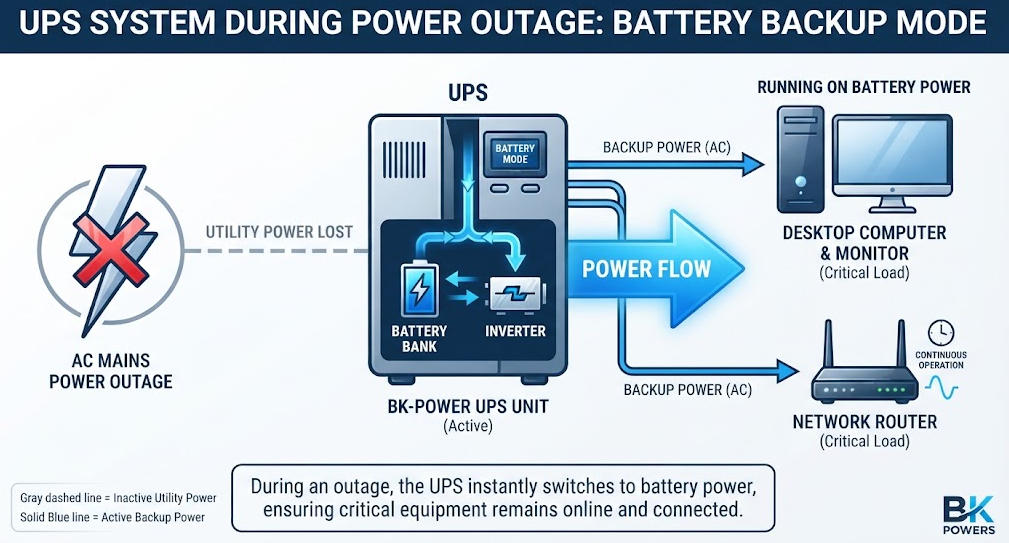
A UPS Eine USV für Computer ist ein elektrisches Gerät. Sie versorgt Computerausrüstung mit Notstrom. Sie schaltet sich ein, wenn die Netzstromversorgung ausfällt oder instabil wird.
2. Zentrale Schutzfunktionen
Eine USV erfüllt vier wichtige Funktionen für Computersysteme. Sie gewährleistet die unterbrechungsfreie Stromversorgung bei Stromausfällen. Sie reguliert die Spannung bei Spannungseinbrüchen und -spitzen. Sie verbessert die Stromqualität durch das Herausfiltern von Störsignalen. Sie ermöglicht kontrollierte Herunterfahren, um Datenverluste zu verhindern.
Das NIST definiert eine USV als ein System, das nach Ausfall der primären Stromquelle eine alternative Stromversorgung bereitstellt. Das IEEE beschreibt USV-Systeme als Infrastruktur zum Schutz empfindlicher elektronischer Geräte vor Stromausfällen. Diese Definitionen betonen, dass eine USV nicht lediglich eine Batterie ist, sondern ein umfassendes Energiemanagementsystem.
Ⅱ. Wie eine USV Computersysteme schützt
1. Stromversorgungssicherheit bei Stromausfällen
Stromausfälle führen zum sofortigen Herunterfahren der Computer. Ungespeicherte Arbeitsergebnisse gehen verloren. Dateisysteme werden beschädigt. Betriebssysteme erleiden Schäden. Eine USV überbrückt die Zeit zwischen Stromausfall und Wiederherstellung der Stromversorgung.
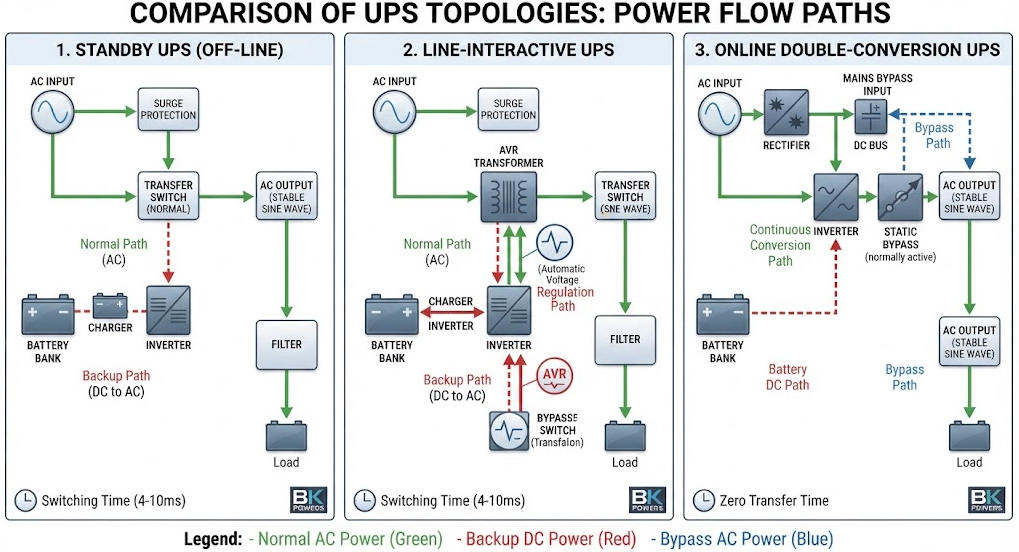
Die Umschaltzeit hängt von der Topologie ab. Standby-USV-Anlagen schalten innerhalb von 2 bis 10 Millisekunden um. Line-Interactive-Modelle schalten innerhalb von 2 bis 4 Millisekunden um. Online-Doppelwandler-Systeme weisen keine Umschaltzeit auf. Der Wechselrichter versorgt die Last stets mit Strom.
Je nach Lastverhalten können bereits kurze Unterbrechungen von Bedeutung sein. Manche Netzteile vertragen Unterbrechungen von 10 Millisekunden. Andere werden sofort zurückgesetzt. Aktive PFC-Schaltungen reagieren besonders empfindlich. Eine Online-USV schließt dieses Risiko vollständig aus.
2. Spannungsregelung und Überspannungsschutz
Spannungsabfälle beeinträchtigen die Leistung des Computers. Überspannung belastet die Netzteile. Überspannungsspitzen zerstören empfindliche Bauteile. Eine USV mit automatischer Spannungsregelung gleicht diese Probleme aus.
Line-Interactive-USV-Anlagen verwenden Transformatoren mit Abgriffen. Sie gleichen Spannungsschwankungen aus, ohne die Batterie zu entladen. Online-USV-Anlagen erzeugen kontinuierlich sauberen Ausgangsstrom. Sie schirmen Computer vor allen Netzstörungen ab.
Ein Überspannungsschutz allein kann Datenverluste nicht verhindern. Ein Überspannungsschutz dämpft Spannungsspitzen. Er bietet jedoch keinen Reservestrom. Eine USV vereint beide Funktionen. Dieser doppelte Schutz rechtfertigt die höheren Anschaffungskosten.
3. Aufbereitung der Stromqualität
Computer enthalten Schaltnetzteile. Diese Geräte erzeugen elektrische Störungen. Außerdem sind sie von Oberschwingungen im Stromnetz betroffen. Eine USV filtert hochfrequente Störungen heraus.
Je nach Lastcharakteristik variieren die Anforderungen an die Stromqualität. Server erfordern strenge THD-Grenzwerte. Gaming-PCs benötigen eine stabile Spannung für die GPUs. Büro-Desktop-PCs vertragen moderate Schwankungen. Die USV-Topologie muss auf die Empfindlichkeit der Last abgestimmt sein.
Elektrische Störungen beeinträchtigen die Datenintegrität. Sie führen zu fehlerhaften Datenübertragungen. Sie stören die Netzwerkkommunikation. Online-USV-Systeme mit Doppelwandlung dämpfen Störungen am effektivsten. Sie bilden die Wechselstromwellenform von Grund auf neu auf.
Ⅲ. USV-Topologien für Computeranwendungen
1. Standby-USV (Offline)
Eine Standby-USV versorgt den Computer normalerweise über das Stromnetz mit Strom. Der Wechselrichter bleibt dabei im Ruhezustand. Die Batterie wird im Normalbetrieb langsam aufgeladen.
Bei einem Stromausfall schaltet ein Relais die Last um. Der Wechselrichter schaltet sich innerhalb von Millisekunden ein. Diese Topologie eignet sich für einfache Heimcomputer. Im Normalbetrieb bietet sie keine Spannungsregelung.
Standby-Anlagen erreichen einen Wirkungsgrad von 95 bis 98 Prozent. Sie sind kostengünstiger als andere Systemkonfigurationen. Allerdings bieten sie nur eine minimale Stromaufbereitung. Bei empfindlichen Geräten kann es zu kurzen Unterbrechungen kommen.
Diese Geräte haben in der Regel eine Leistung zwischen 400 und 1000 VA. Sie dienen zum Schutz einzelner Desktop-Computer. Außerdem versorgen sie Router und Modems mit Strom. Verwenden Sie sie nicht für Server oder Gaming-PCs.
2. Line-Interaktive USV
Eine line-interaktive USV verfügt über eine automatische Spannungsregler. Es kommt ein Mehrstufentransformator zum Einsatz. Der AVR gleicht Unter- und Überspannungszustände aus.
Bei einem Netzausfall übernimmt der Wechselrichter die Last. Die Umschaltzeit liegt zwischen 2 und 4 Millisekunden. Diese Topologie schafft einen Ausgleich zwischen Schutz und Kosten. Der Wirkungsgrad liegt in der Regel bei 90 bis 96 Prozent.
Line-Interactive-USV-Anlagen eignen sich für kleine Büros. Sie schützen Netzwerkgeräte und Arbeitsplätze. Sie trennen die Verbraucher nicht vom Stromnetz. Frequenzabweichungen und starke Störgeräusche werden nicht unterdrückt.
Die meisten Computerbenutzer entscheiden sich für diese Topologie. Sie gleicht die in Wohngebieten üblichen Spannungsschwankungen aus. Außerdem bietet sie eine ausreichende Sicherungszeit für ein sicheres Herunterfahren. Die Modelle reichen von 600 VA bis 3000 VA.
3. Online-Doppelwandler-USV
Eine Online-USV wandelt Wechselstrom kontinuierlich in Gleichstrom und wieder zurück in Wechselstrom um. Der Gleichrichter lädt die Batterie auf. Der Wechselrichter versorgt die Last jederzeit mit Strom.
Diese Architektur gewährleistet eine Umstellungszeit von null. Sie bietet vollständige Isolierung gegenüber Netzschwankungen. Die Spannungsregelung liegt innerhalb von plus/minus 1 Prozent. Der Ausgangs-THD bleibt unter 3 Prozent.
Online-USV-Anlagen eignen sich für kritische Server. Sie schützen die Geräte in Rechenzentren. Außerdem kommen sie in medizinischen und industriellen Computern zum Einsatz. Der Nachteil sind höhere Kosten und ein etwas geringerer Wirkungsgrad.
Moderne transformatorlose Konstruktionen verbessern den Wirkungsgrad. Einige Geräte erreichen im Eco-Modus einen Wirkungsgrad von 96 bis 99 Prozent. Sie nutzen IGBT- oder SiC-MOSFET-Technologie. Diese Fortschritte senken die Betriebskosten bei großen Installationen.
4. Topologievergleich
| Merkmal | Standby-USV | Line-Interaktive USV | Online-Doppelwandler-USV |
|---|---|---|---|
| Normaler Strompfad | Direkt zum Versorgungsunternehmen | Hilfsprogramm mit AVR | Wechselrichter immer |
| Übertragungszeit | 2-10 ms | 2-4 ms | 0 ms |
| Spannungsregelung | Keine | Begrenzte Reichweite | Kontinuierlich, ±1% |
| Stromaufbereitung | Grundlegend | Mäßig | Völlige Isolation |
| Typischer Wirkungsgrad | 95–98% | 90–96% | 90–96% (moderne Einheiten) |
| Am besten geeignet für | Heim-PCs, Router | Büroarbeitsplätze | Server, Gaming-PCs |
| Relative Kosten | Niedrigster | Mäßig | Höchste |
Dieser Vergleich ist rein theoretischer Natur. Die tatsächliche Leistung variiert je nach Hersteller. Überprüfen Sie die technischen Daten stets anhand der Testergebnisse gemäß IEC 62040-3.
Ⅳ. Analyse der Computerlast und Dimensionierung der USV
1. Typischer Stromverbrauch von Computern
Eine genaue Dimensionierung beginnt mit einer Bestandsaufnahme der Last. Messen Sie jedes an die USV angeschlossene Gerät. Berücksichtigen Sie dabei Computer, Monitore, Router und Peripheriegeräte.
Die typische Leistungsaufnahme variiert je nach Gerätetyp. Büro-Desktop-PCs verbrauchen 80 bis 200 Watt. Gaming-PCs verbrauchen 250 bis 450 Watt. All-in-One-Computer verbrauchen 50 bis 120 Watt. Monitore verbrauchen je nach Größe zusätzlich 25 bis 80 Watt.
Netzwerkgeräte verursachen einen geringeren Stromverbrauch. WLAN-Router verbrauchen 10 bis 25 Watt. NAS-Geräte verbrauchen 20 bis 60 Watt. Externe Festplatten verbrauchen 5 bis 15 Watt. Laserdrucker verbrauchen beim Drucken 300 bis 600 Watt.
Überprüfen Sie stets die Angaben auf dem Typenschild. Diese geben die maximal mögliche Stromaufnahme an. Der tatsächliche Verbrauch liegt in der Regel darunter. Verwenden Sie für eine genaue Messung ein Steckdosen-Strommessgerät. So vermeiden Sie eine gefährliche Überdimensionierung.
2. VA im Vergleich zu Watt und Leistungsfaktor
USV-Anlagen weisen zwei Nennwerte auf. VA gibt die Scheinleistung an. Watt gibt die Wirkleistung an. Das Verhältnis zwischen beiden lässt sich wie folgt beschreiben: Leistungsfaktor.
Die Formel ist einfach: kVA entspricht kW geteilt durch den Leistungsfaktor. Moderne Computer-Netzteile erreichen Leistungsfaktoren von 0,90 bis 0,99. Ältere Geräte können Leistungsfaktoren von nur 0,70 aufweisen.
Eine USV muss beide Nennwerte erfüllen. Eine Last kann den Nennwert in Watt überschreiten, solange sie unter dem VA-Grenzwert bleibt. Ingenieure müssen bei der Auswahl beide Werte überprüfen.
Moderne USV-Anlagen mit einheitlichem Leistungsfaktor vereinfachen dies. Ihre Nennleistung in kW entspricht ihrer Nennleistung in kVA. Ältere Geräte mit einem Leistungsfaktor von 0,8 schränken die tatsächliche Leistungsabgabe. Überprüfen Sie stets beide Angaben auf dem Datenblatt.
3. Methodik zur Dimensionierungsberechnung
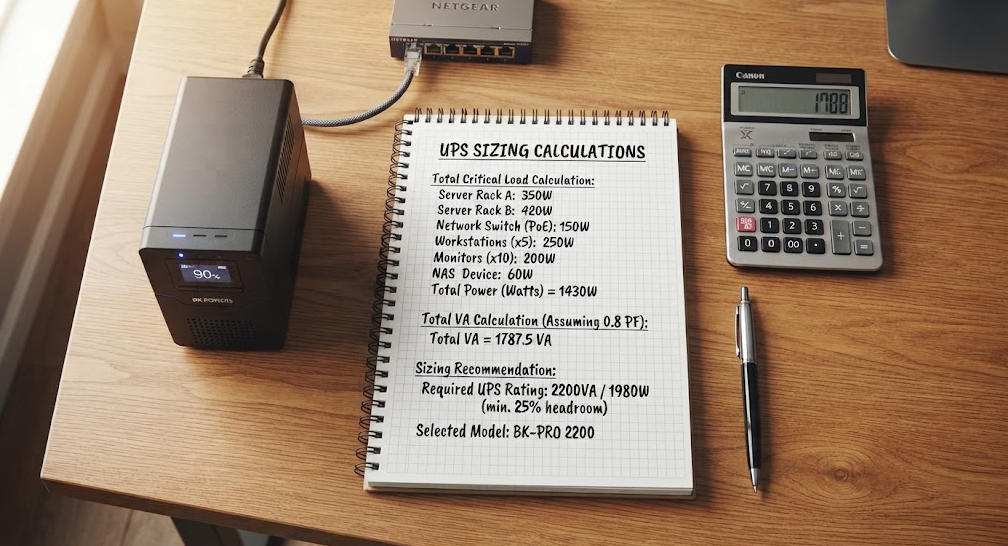
Befolgen Sie diese Schritte, um eine USV für Computer auszuwählen. Erstellen Sie zunächst eine Bestandsliste aller zu schützenden Geräte. Notieren Sie die Leistungsaufnahme jedes Geräts. Addieren Sie die Gesamtlast in Watt.
Zweitens: Rechnen Sie die Watt in VA um. Teilen Sie die Gesamtleistung in Watt durch den Leistungsfaktor der Last. Verwenden Sie bei modernen Geräten den Wert 0,90, falls dieser nicht bekannt ist.
Drittens: Planen Sie eine Wachstumsreserve ein. Rechnen Sie 20 bis 25 Prozent für zukünftige Erweiterungen hinzu. So vermeiden Sie einen vorzeitigen Austausch.
Viertens: Berücksichtigen Sie eine Belastungsreserve. Auslegen Sie das System auf 70 bis 80 Prozent der Nennleistung der USV. So bleibt Spielraum für Einschaltströme und Transienten.
Fünftens: Wählen Sie den nächsten Standard aus UPS-Größe. Vergleichen Sie sowohl die kVA- als auch die kW-Nennleistung mit Ihrer berechneten Last.
4. Beispiel für ein Arbeitsblatt zur Größenbestimmung
| Gerät | Anzahl | Watt pro Stück | Gesamtleistung in Watt |
|---|---|---|---|
| Desktop-PC (Büro) | 1 | 150 | 150 |
| 24-Zoll-LED-Monitor | 2 | 35 | 70 |
| WLAN-Router | 1 | 15 | 15 |
| Externe Festplatte | 1 | 10 | 10 |
| Zwischensumme | 245 | ||
| Leistungsfaktoranpassung (÷0,9) | 272 VA | ||
| Wachstumsmarge (+25%) | 340 VA | ||
| Empfohlene USV | mindestens 600 VA / 360 W |
Dieses Beispiel veranschaulicht die Vorgehensweise. Die tatsächlichen Anforderungen hängen von der jeweiligen Ausrüstung ab. Messen Sie die tatsächliche Leistungsaufnahme nach Möglichkeit immer mit einem Leistungsmesser.
Ⅴ. Akkutechnologie und Laufzeit
1. VRLA-Batterien im Vergleich zu Lithium-Ionen-Batterien
USV-Batterien speichern Energie für den Fall von Stromausfällen. Zwei Batterietypen dominieren den Markt. VRLA-Blei-Säure-Batterien sind nach wie vor weit verbreitet. Lithium-Ionen-Batterien gewinnen rasch Marktanteile hinzu.
VRLA-Batterien sind in der Anschaffung günstiger. Unter normalen Bedingungen haben sie eine Lebensdauer von 3 bis 5 Jahren. Sie sind temperaturempfindlich. Hohe Umgebungstemperaturen über 30 Grad Celsius verkürzen ihre Lebensdauer erheblich.
Lithium-Ionen-Akkus bieten eine höhere Energiedichte. Ihre Lebensdauer beträgt 8 bis 15 Jahre. Sie laden sich schneller auf und sind in einem größeren Temperaturbereich einsetzbar. Ihre Anschaffungskosten sind höher. Bei langfristigen Einsätzen sprechen die Gesamtbetriebskosten jedoch oft für Lithium-Ionen-Akkus.
Batteriemanagementsysteme verlängern die Lebensdauer beider Typen. Durch temperaturkompensiertes Laden wird die Spannung angepasst. Automatische Tests erkennen schwache Zellen frühzeitig. Diese Funktionen gehören bei hochwertigen USV-Geräten zur Standardausstattung.
2. Berechnung der Laufzeit
Die Laufzeit hängt ab von Batteriekapazität und die Last. Die Grundformel liefert einen theoretischen Schätzwert. Multiplizieren Sie die Batteriespannung mit den Amperestunden. Multiplizieren Sie das Ergebnis dann mit dem Wirkungsgrad. Teilen Sie das Ergebnis durch die Lastleistung.
Die tatsächliche Laufzeit weicht von der theoretischen ab. Kapazität der Batterie nimmt bei hohen Entladungsraten ab. Die Temperatur beeinflusst die Geschwindigkeit chemischer Reaktionen. Durch Alterung verringert sich die verfügbare Kapazität im Laufe der Zeit.
Die Hersteller veröffentlichen Entladungsdiagramme bei konstanter Leistung. Diese Diagramme zeigen die tatsächliche Laufzeit bei bestimmten Belastungsstufen. Ingenieure sollten diese Diagramme für die endgültige Auswahl heranziehen. Die theoretische Formel dient lediglich zur vorläufigen Abschätzung.
Bei Computeranwendungen variieren die Laufzeitziele. Privatanwender benötigen 5 bis 10 Minuten für ein sicheres Herunterfahren. In Büros sind möglicherweise 15 bis 30 Minuten erforderlich. In Serverräumen werden die Batterien so dimensioniert, dass sie die Überbrückungszeit bis zum Einsatz des Generators abdecken. Dies erfordert in der Regel 10 bis 15 Minuten.
3. Vergleich der Batterietechnologien
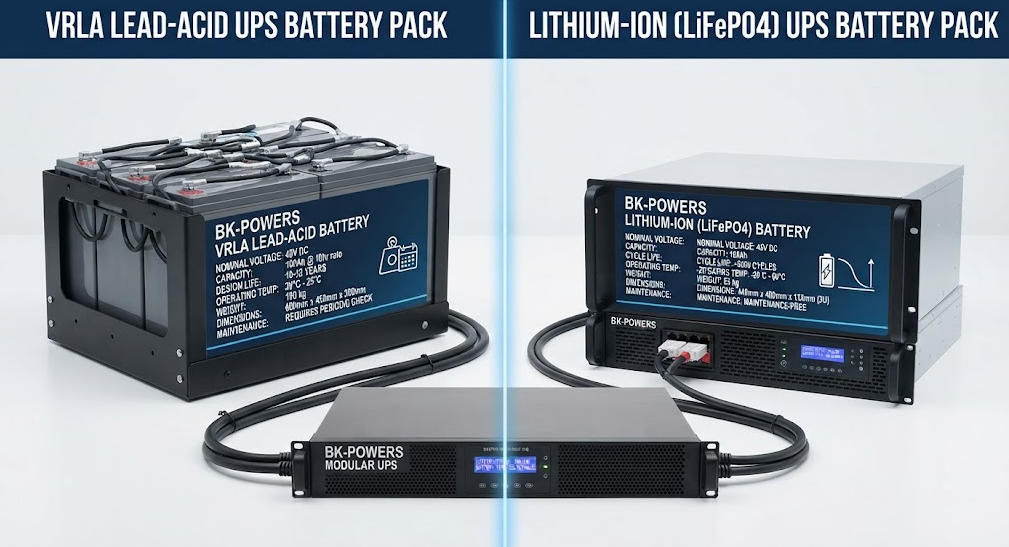
| Parameter | VRLA Blei-Säure | Lithium-Ionen |
|---|---|---|
| Typische Lebensdauer | 3-5 Jahre | 8-15 Jahre |
| Energiedichte | Unter | 3-mal höher |
| Ladezeit | 4–8 Stunden | 1-3 Stunden |
| Temperaturempfindlichkeit | Deutlich über 30 °C | Mäßig |
| Entladungstiefe | 50–80% | 80–95% |
| Anfängliche Kosten | Unter | 2–3-mal höher |
| Wartung | Regelmäßige Überprüfung | Minimal |
| Am besten geeignet für | Kurzfristige Sicherung, Budget | Lange Laufzeit, hochwertige Konfigurationen |
Ⅵ. Ausgangswellenform: Reine Sinuswelle vs. simulierte Sinuswelle
1. Warum Wellenformen für Computer wichtig sind
USV-Wechselrichter liefern unterschiedliche Ausgangsleistungen Wellenformen. Eine reine Sinuswelle entspricht genau dem Netzstrom. Eine simulierte Sinuswelle basiert auf stufenweisen Annäherungen.
Moderne Computer verwenden Netzteile mit aktiver Leistungsfaktorkorrektur (PFC). Diese Netzteile benötigen eine reine Sinuswelle als Eingangssignal. Eine simulierte Welle kann zu Systemabstürzen führen. Außerdem kann es zu Überhitzung oder ungewöhnlichen Lüftergeräuschen kommen.
Eaton hält eine reine Sinuswelle für unverzichtbar für Server mit PFC-Funktion. Die gleichmäßige Wellenform hält die harmonische Verzerrung unter 5 Prozent. Simulierte Wellen bergen Kompatibilitätsrisiken für empfindliche Elektronik.
Der Unterschied ist auf einem Oszilloskop zu erkennen. Eine reine Sinuswelle zeigt glatte Kurven. Eine simulierte Welle weist rechteckige Sprünge auf. Diese Sprünge enthalten hochfrequente Oberschwingungen. Die Oberschwingungen belasten Kondensatoren und Transformatoren.
2. Kompatibilitätsleitfaden
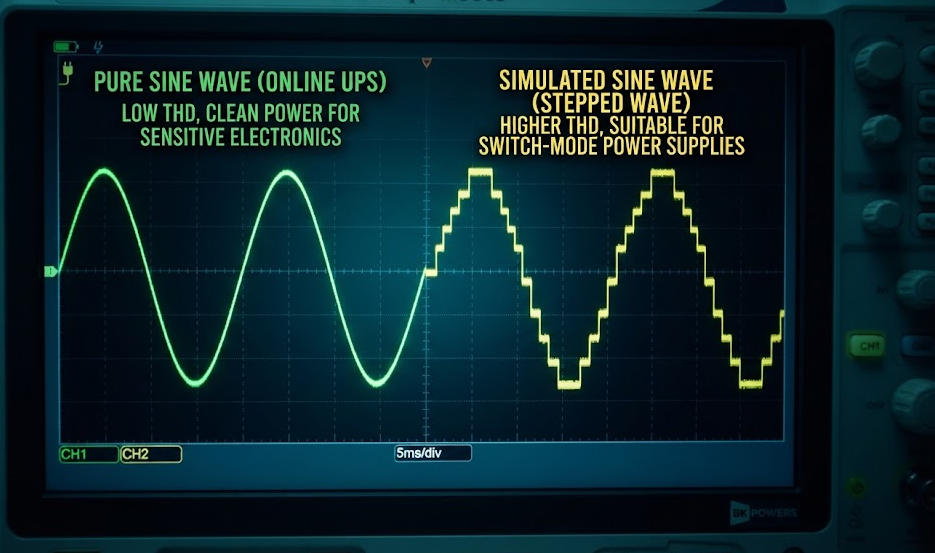
USV-Systeme mit reiner Sinuswelle eignen sich für alle Computertypen. Sie funktionieren mit Gaming-PCs, Workstations und Servern. Sie beseitigen elektromagnetische Störungen, die die Datenübertragung beeinträchtigen.
Für einfache Router reichen Netzteile mit simulierter Sinuswelle aus. Sie versorgen auch Desktop-PCs ohne PFC mit Strom. Allerdings besteht die Gefahr, dass sie Netzteile mit aktiver PFC beschädigen. Der Preisunterschied zwischen den beiden Typen hat sich verringert. Die meisten Computerbenutzer sollten sich für reine Sinuswelle entscheiden.
Gaming-PCs mit Grafikkarten mit hoher Leistungsaufnahme benötigen eine reine Sinuswelle. Das Netzteil zieht einen hohen Einschaltstrom. Simulierte Wellenformen können diesen Bedarf nicht decken. Für Workstations mit professionellen Grafikkarten gilt dieselbe Anforderung.
Ⅶ. USV vs. Spannungsstabilisator für Computer
1. Grundlegende Unterschiede
Eine USV sorgt bei Stromausfällen für eine Notstromversorgung. Eine Spannungsstabilisator Es regelt lediglich die Spannung. Bei Stromausfällen kann es keine Geräte mit Strom versorgen.
Eine USV kann über eine Spannungsregelung verfügen. Ob dies der Fall ist, hängt von der Topologie ab. Line-Interactive- und Online-Geräte bieten diese Funktion. Standby-Geräte hingegen nicht.
Spannung Stabilisatoren Verwenden Sie Servomotoren oder Thyristor-Module. Diese regeln die Ausgangsspannung stufenlos. Ihre Reaktionszeit liegt zwischen 10 und 100 Millisekunden. Das ist langsamer als das Schalten einer USV, reicht aber für die Spannungskorrektur aus.
2. Wann welches Gerät verwendet werden sollte
Computer in Gebieten mit häufigen Stromausfällen benötigen eine USV. Die Notstromversorgung verhindert Datenverluste. Außerdem ermöglicht sie ein sicheres Herunterfahren.
Computer in Gebieten mit stabiler Stromversorgung, aber starken Spannungsschwankungen benötigen möglicherweise einen Stabilisator. Die meisten Computerbenutzer profitieren jedoch stärker von einer USV. Die Notstromfunktion deckt das größte Risiko ab.
In manchen Anlagen kommen beide Geräte zum Einsatz. Der Stabilisator ist vor der USV geschaltet, die USV dahinter. Diese Architektur bietet umfassenden Schutz. Außerdem erweitert sie USV-Batterie Lebensdauer durch Verringerung der Spannungsbelastung.
Ⅷ. Auswahl der richtigen USV für Ihren Computer
1. Heim- und Desktop-PCs
Heimbüro-Systeme haben in der Regel eine Leistungsaufnahme von 200 bis 400 Watt. Eine line-interaktive USV mit einer Leistung von 600 bis 1000 VA ist für die meisten Nutzer geeignet. Sie bietet eine Laufzeit von 10 bis 30 Minuten.
Wählen Sie für moderne Desktop-Computer einen reinen Sinusausgang. Vergewissern Sie sich, dass die USV über genügend batteriegepufferte Steckdosen verfügt. Schließen Sie Monitore und Router an geschützte Anschlüsse an. Schließen Sie Laserdrucker nur an Überspannungsschutz-Steckdosen an.
Denken Sie an USB-Überwachungsanschlüsse. Diese ermöglichen den Einsatz von Software zum automatischen Herunterfahren. Die Software beendet Anwendungen ordnungsgemäß. Außerdem schaltet sie das System ab, bevor der Akku leer ist.
2. Gaming-PCs und Workstations
Gaming-PCs benötigen mehr Strom. Systeme der Mittelklasse verbrauchen 400 bis 550 Watt. High-End-Systeme mit diskreten Grafikkarten können mehr als 600 Watt verbrauchen.
Wählen Sie eine netzinteraktive oder Online-USV mit einer Leistung von 1000 bis 1500 VA. Bei Netzteilen mit aktiver PFC ist eine reine Sinuswelle zwingend erforderlich. Die Laufzeit bei Volllast kann auf 5 bis 15 Minuten sinken. Ziehen Sie für eine längere Autonomie erweiterte Akkupacks in Betracht.
LCD-Anzeigen helfen dabei, den Ladezustand zu überwachen. Sie zeigen die Eingangsspannung, den Akkustatus und die verbleibende Laufzeit an. Diese Übersicht verhindert unerwartete Abschaltungen während des Spielens.
3. Server und Rechenzentrumsausrüstung
Server benötigen Online-USV-Anlagen mit Doppelwandlung. Diese Geräte sorgen für eine vollständige Isolierung. Außerdem gewährleisten sie eine präzise Spannungsregelung.
Die Dimensionierung der USV erfolgt anhand der Nennleistungen in kW und kVA. Für kritische Anwendungen ist eine N+1-Redundanz vorzusehen. Die Laufzeit ist mit den Startsequenzen des Generators abzustimmen. Nach IEC 62040-3 werden diese Geräte als VFI-Topologie klassifiziert.
USV-Geräte für den Rack-Einbau sparen Platz. Sie lassen sich in standardmäßige 19-Zoll-Schränke einschieben. Dank modularer Bauweise ist eine Kapazitätserweiterung möglich. Durch im laufenden Betrieb austauschbare Module ist eine Wartung ohne Ausfallzeiten möglich.
Ⅸ. Standards und Compliance
1. Normenreihe IEC 62040
Die Norm IEC 62040-1 befasst sich mit den Sicherheitsanforderungen für USV-Anlagen. Sie umfasst Vorschriften zur Gefahrenvermeidung sowie Konstruktionsnormen. Die Norm IEC 62040-3 definiert Leistungsmerkmale und Prüfverfahren. Sie klassifiziert Topologien als VFD, VI oder VFI.
VFD steht für „spannungs- und frequenzabhängig“. Zu dieser Klasse gehören Standby-USVs. VI bedeutet „spannungsunabhängig“. Diese Klasse umfasst line-interaktive Modelle. VFI bedeutet „spannungs- und frequenzunabhängig“. Diese Klasse beschreibt Online-Doppelwandler-Systeme.
Die Einhaltung der Norm IEC 62040-3 gewährleistet eine geprüfte Leistung. Sie garantiert die Einhaltung der Grenzwerte für Übertragungszeit, Spannungsregelung und Klirrfaktor (THD). Käufer sollten von den Herstellern Prüfberichte anfordern.
2. UL 1778 und regionale Zertifizierungen
Die Norm UL 1778 bildet den Sicherheitsrahmen für USV-Anlagen in Nordamerika. Sie umfasst die Bereiche elektrische Sicherheit und Brandschutz. Die CE-Kennzeichnung gilt für die europäischen Märkte. Sie setzt die Einhaltung der Niederspannungsrichtlinie voraus.
Überprüfen Sie vor dem Kauf stets die Prüfzeichen. Nicht zertifizierte Geräte verfügen möglicherweise nicht über den erforderlichen Schutz. Außerdem können sie gegen die örtlichen Elektrovorschriften verstoßen.
Zertifizierte Geräte werden thermischen Tests unterzogen. Außerdem bestehen sie dielektrische Festigkeitsprüfungen. Diese Verfahren gewährleisten einen sicheren Betrieb unter Fehlerbedingungen. Installieren Sie niemals nicht zertifizierte USV-Anlagen in gewerblichen Umgebungen.
Ⅹ. Schlussfolgerung
Eine USV für Computer ist ein unverzichtbarer Bestandteil der Infrastruktur. Sie schützt vor Stromausfällen, Spannungsabfällen, Überspannungen und Störspannungen. Die richtige Topologie hängt davon ab, wie kritisch Ihre Last ist. Standby-Geräte eignen sich für den einfachen Heimgebrauch. Line-Interactive-Modelle bieten ein ausgewogenes Verhältnis zwischen Kosten und Schutz. Online-Doppelwandler-Systeme kommen bei geschäftskritischen Servern zum Einsatz.
Für die richtige Dimensionierung ist eine genaue Lastmessung erforderlich. Rechnen Sie die Watt-Angabe mithilfe des Leistungsfaktors in VA um. Berücksichtigen Sie Wachstums- und Lastspielräume. Wählen Sie für moderne Computer einen reinen Sinusausgang. Entscheiden Sie sich je nach Ihren Anforderungen an die Laufzeit und Ihr Budget für VRLA- oder Lithium-Ionen-Batterien.
Betrachten Sie die USV als Teil einer umfassenderen Stromversorgungsarchitektur. Stimmen Sie sie auf Überspannungsschutz, Erdung und Generatoren ab. Dieser Ansatz gewährleistet die langfristige Zuverlässigkeit Ihrer digitalen Geräte.
Erhebung relevanter Informationen
| Titel | Kerninhalte | URL |
|---|---|---|
| Was macht eine unterbrechungsfreie Stromversorgung? | Allgemeine USV-Funktionen, Komponenten und Funktionsprinzipien für alle Anwendungsbereiche | https://bkpowers.com/service/what-does-ups-do/ |
| Was ist eine USV in einem Computersystem? | Definition und Bedeutung von USV speziell für Computersysteme | https://bkpowers.com/service/what-is-ups-in-computer-system/ |
| Rechner für die Notstromlaufzeit von USV-Anlagen | Methodik zur Berechnung der Betriebsdauer und Lastmanagement für USV-Anlagen | https://bkpowers.com/service/ups-backup-time-calculator/ |
| Berechnung der Notstromversorgungsdauer für industrielle USV-Anlagen | Detaillierte Formeln zur Berechnung der Notstromversorgungsdauer und Konfiguration für verschiedene Szenarien | https://bkpowers.com/service/battery-backup-time-calculation-for-ups/ |
| So funktionieren industrielle USV-Anlagen | Ein tiefer Einblick in den Betrieb von Gleichrichter, Wechselrichter, Batterie und Bypass | https://bkpowers.com/service/how-industrial-ups-systems-work/ |
| Die technischen Daten von USV-Anlagen für den industriellen Einsatz verstehen | Eingangsspannungsbereich, Wirkungsgrad und industrielle Normen für USV-Anlagen | https://bkpowers.com/service/understanding-industrial-power-ups-specifications-guide/ |
| Was ist ein Industrielle Frequenz USV? | Technische Unterschiede zwischen transformatorbasierten und Hochfrequenz-USVs | https://bkpowers.com/service/what-is-an-industrial-frequency-ups/ |
| Wofür steht die Abkürzung UPS?? | Definition, Funktionsweise und Topologievergleich von USV-Anlagen | https://bkpowers.com/service/what-does-ups-stand-for/ |
| Was ist eine USV? Entdecken Sie die Vorteile einer unterbrechungsfreien Stromversorgung | Umfassender Leitfaden zu den USV-Typen „Standby“, „Line-Interactive“ und „Online“ | https://bkpowers.com/service/what-is-ups-and-how-it-works/ |
| Kosten-Nutzen-Analyse: USV vs. Spannungsstabilisatoren | Vergleich von Kosten, Effizienz und Kapitalrendite (ROI) zwischen USV-Anlagen und Spannungsstabilisatoren | https://bkpowers.com/service/ups-vs-voltage-stabilizers-cost/ |
Quellenangaben
| Titel | Kerninhalte | URL |
|---|---|---|
| IEEE – Unterbrechungsfreie Stromversorgungen | Technische Definitionen, Normen zur Stromversorgungskontinuität und Architektur von USV-Komponenten | https://www.ieee.org/ |
| IEC 62040-1 – Sicherheitsanforderungen für USV-Anlagen | Internationale Sicherheitsanforderungen für unterbrechungsfreie Stromversorgungssysteme | https://webstore.iec.ch/publication/66912 |
| IEC 62040-3 – Leistung und Prüfung von USV-Anlagen | Leistungsklassifizierung (VFD/VI/VFI), Prüfverfahren und Wirkungsgrad-Richtwerte | https://webstore.iec.ch/publication/66913 |
| US-Energieministerium – Energieeffiziente USV-Anlagen | Leitlinien zur Effizienz von USV-Anlagen, Lastoptimierung und modulare USV Empfehlungen | https://www.energy.gov/ |
| UL Solutions – Norm UL 1778 für USV-Anlagen | Rahmenwerk für die Sicherheitszertifizierung von unterbrechungsfreien Stromversorgungssystemen in Nordamerika | https://www.ul.com/ |
FAQ
Frage 1: Welche Größe sollte die USV für meinen Computer haben?
Direkte Antwort: Bestimmen Sie die Größe Ihrer USV, indem Sie die Gesamtleistung Ihrer Geräte in Watt addieren, durch den Leistungsfaktor dividieren und die Reserve von 25% hinzurechnen. Technische Erläuterung: Die meisten Heimbüros benötigen 600–1000 VA. Gaming-PCs benötigen 1000–1500 VA. Server benötigen Online-Geräte mit N+1-Redundanz. Praktische Anwendung: Verwenden Sie einen Leistungsmesser, um die tatsächliche Leistungsaufnahme zu messen. Verlassen Sie sich niemals ausschließlich auf die Angaben auf dem Typenschild.
Frage 2: Was ist der Unterschied zwischen VA und Watt?
Direkte Antwort: Die Scheinleistung (VA) ist die scheinbare Leistung. Die Wirkleistung (Watt) ist die tatsächliche Leistung. Der Leistungsfaktor verbindet beide. Technische Erläuterung: Die Formel lautet: VA = Watt ÷ Leistungsfaktor. Moderne Computer haben einen Leistungsfaktor von etwa 0,9 bis 0,99. Eine USV muss beide Nennwerte übertreffen. Praktische Anwendung: Achten Sie bei der Auswahl einer USV auf beide Werte. Die Unity-PF-Geräte erleichtern die Auswahl.
Frage 3: Wie lange hält eine USV meinen Computer am Laufen?
Direkte Antwort: Die Laufzeit hängt von der Akkukapazität und der Last ab. Eine typische USV für den Hausgebrauch bietet eine Laufzeit von 10 bis 30 Minuten. Technische Erläuterung: Die Hersteller veröffentlichen Entladungsdiagramme bei konstanter Leistung. Hohe Entladungsraten verringern die nutzbare Kapazität. Praktische Anwendung: Passen Sie die Dauer an Ihr Ziel an. Planen Sie 5–10 Minuten für das Herunterfahren ein. Planen Sie 15–30 Minuten für die Generatorüberbrückung ein.
Frage 4: Benötige ich für meinen Computer eine reine Sinuswelle?
Direkte Antwort: Ja, sofern Ihr Computer über ein aktives PFC-Netzteil verfügt. Die meisten modernen Desktop-PCs und alle Server verfügen darüber. Technische Erläuterung: Simulierte Sinuswellen können zu Ausfällen oder Überhitzung führen. Eine reine Sinuswelle hält den Klirrfaktor unter 5%. Praktische Anwendung: Wählen Sie eine reine Sinuswelle für Gaming-PCs und Workstations. Eine simulierte Wellenform reicht nur für einfache Router aus.
Frage 5: Kann eine USV einen Spannungsstabilisator ersetzen?
Direkte Antwort: Eine USV sorgt für Notstromversorgung. Ein Spannungsregler regelt lediglich die Spannung. Sie erfüllen unterschiedliche Aufgaben. Technische Erläuterung: Line-Interactive- und Online-USVs verfügen über eine automatische Spannungsregelung (AVR). Standby-USVs hingegen nicht. In manchen Konfigurationen kommen beide Geräte zum Einsatz. Praktische Anwendung: Wenn es bei Ihnen häufig zu Stromausfällen kommt, sollten Sie sich eine USV anschaffen. Wenn die Spannung schwankt, die Stromversorgung aber ansonsten stabil ist, kann ein Spannungsstabilisator Abhilfe schaffen.