Добро пожаловать в BKPOWER!












ИБП для компьютеров: защита вашего цифрового мира
СОВЕТЫ: ИБП для компьютеров обеспечивает резервное питание при сбоях в электросети. Он защищает настольные компьютеры, игровые системы и серверы от потери данных. В данном руководстве рассматриваются топологии ИБП, определение необходимой мощности и выбор резервных аккумуляторов.
Ⅰ. Какую роль играет ИБП в работе компьютеров?
1. Прямой ответ
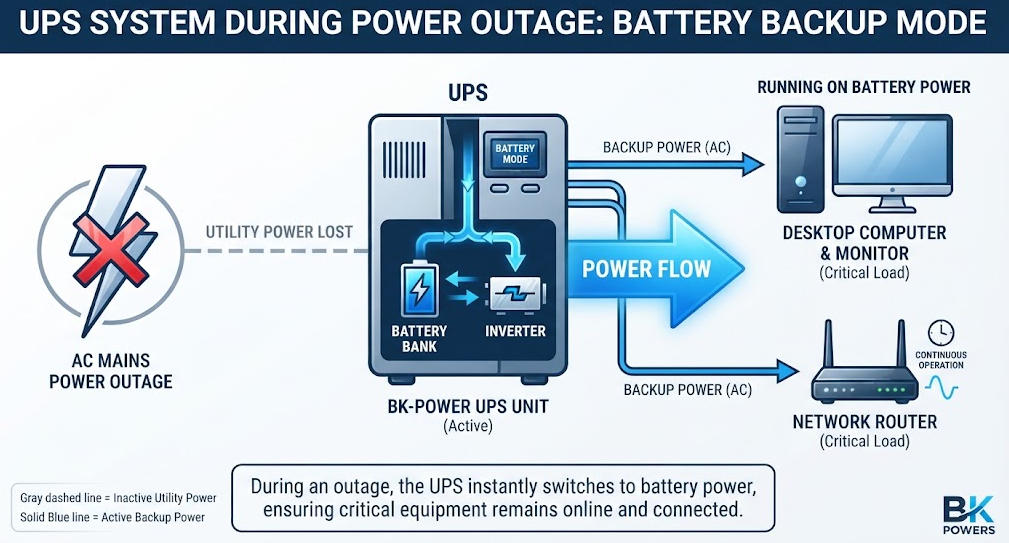
A ИБП для компьютеров — это электрическое устройство. Оно обеспечивает резервное питание компьютерного оборудования. Оно включается при отключении или нестабильности электросети.
2. Основные функции защиты
ИБП выполняет четыре важнейшие функции для компьютерных систем. Он обеспечивает непрерывность электропитания во время отключений. Он регулирует напряжение при его падениях и скачках. Он улучшает качество электроэнергии, фильтруя помехи. Он обеспечивает контролируемое отключение оборудования для предотвращения потери данных.
NIST определяет ИБП как систему, обеспечивающую резервное электропитание в случае отключения основного источника. IEEE описывает системы ИБП как инфраструктуру защиты электропитания для чувствительного электронного оборудования. Эти определения подчеркивают, что ИБП — это не просто аккумулятор. Это комплексная система управления электропитанием.
Ⅱ. Как ИБП защищает компьютерные системы
1. Обеспечение бесперебойного электроснабжения во время отключений
Отключения электроэнергии приводят к немедленному отключению компьютеров. Несохраненные данные теряются. Файловые системы повреждаются. Операционные системы получают повреждения. ИБП обеспечивает переходный период между отключением электросети и восстановлением питания.
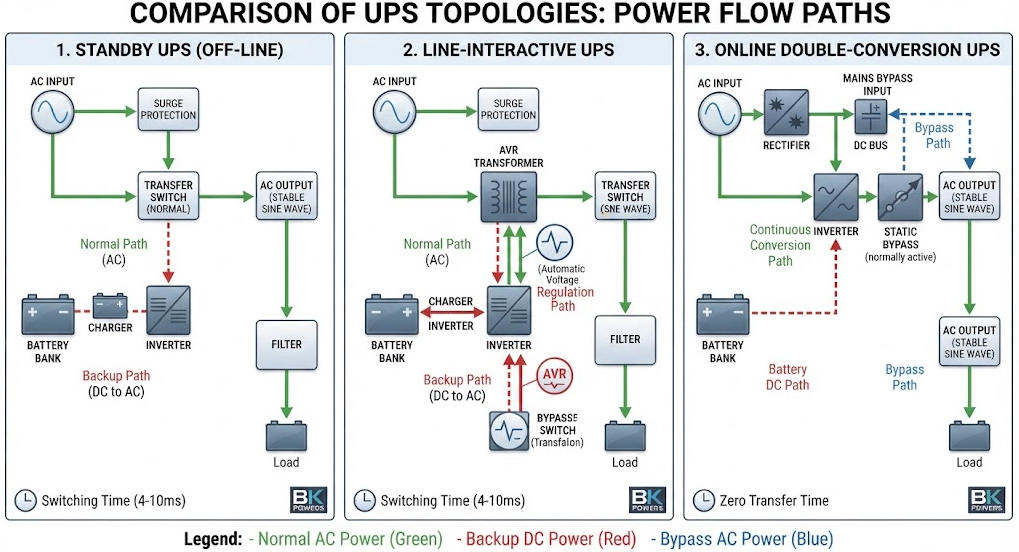
Время переключения зависит от топологии. Блоки бесперебойного питания в режиме ожидания переключаются за 2–10 миллисекунд. Модели с линейно-интерактивным режимом работы переключаются за 2–4 миллисекунды. Системы с двойным преобразованием в режиме онлайн обеспечивают нулевое время переключения. Нагрузка постоянно питается от инвертора.
В зависимости от характеристик нагрузки даже кратковременные перебои в питании имеют значение. Некоторые источники питания допускают перебои продолжительностью до 10 миллисекунд. Другие же мгновенно перезапускаются. Особенно чувствительны схемы активной коррекции коэффициента мощности (PFC). ИБП онлайн-типа полностью исключают этот риск.
2. Регулирование напряжения и защита от скачков напряжения
Падения напряжения снижают производительность компьютера. Перенапряжение создает нагрузку на источники питания. Скачки напряжения выводят из строя чувствительные компоненты. ИБП с автоматической регулировкой напряжения устраняет эти проблемы.
В системах ИБП линейно-интерактивного типа используются трансформаторы с отводами. Они корректируют напряжение, не разряжая аккумулятор. Системы ИБП онлайн-типа непрерывно генерируют чистый выходной сигнал. Они изолируют компьютеры от всех помех в электросети.
Одно лишь использование устройства защиты от перенапряжения не может предотвратить потерю данных. Устройство защиты от перенапряжения сглаживает скачки напряжения. Оно не обеспечивает резервное питание. ИБП сочетает в себе обе эти функции. Такая двойная защита оправдывает более высокие затраты.
3. Улучшение качества электроэнергии
Компьютеры оснащены импульсными источниками питания. Эти устройства генерируют электрические помехи. Кроме того, они подвержены воздействию гармоник в сети. ИБП фильтрует высокочастотные помехи.
В зависимости от характеристик нагрузки требования к качеству электроэнергии могут различаться. Серверы требуют соблюдения строгих пределов коэффициента нелинейных искажений (THD). Игровые ПК нуждаются в стабильном напряжении для графических процессоров. Офисные настольные компьютеры допускают умеренные колебания напряжения. Топология ИБП должна соответствовать чувствительности нагрузки.
Электрические помехи негативно влияют на целостность данных. Они приводят к повреждению данных при передаче. Они нарушают сетевую связь. Системы ИБП с двойным преобразованием наиболее эффективно подавляют помехи. Они полностью восстанавливают форму сигнала переменного тока.
Ⅲ. Топологии ИБП для компьютерных систем
1. ИБП резервного питания (автономный режим)
В режиме ожидания ИБП обычно питает компьютер от сети. Инвертор находится в режиме ожидания. В ходе нормальной работы аккумулятор подзаряжается небольшим током.
При сбое питания реле переключает нагрузку. Инвертор включается в течение миллисекунд. Эта топология подходит для простых домашних компьютеров. В режиме нормальной работы она не обеспечивает регулирования напряжения.
Агрегаты резервного питания обеспечивают КПД от 95 до 98 процентов. Их стоимость ниже, чем у агрегатов других топологий. Однако они обеспечивают минимальную стабилизацию напряжения. В чувствительном оборудовании могут наблюдаться кратковременные перебои в питании.
Мощность таких устройств обычно составляет от 400 до 1000 ВА. Они предназначены для защиты отдельных настольных компьютеров. Кроме того, они обеспечивают питание маршрутизаторов и модемов. Не используйте их для серверов или игровых ПК.
2. Линейно-интерактивный ИБП
Линейно-интерактивное ИБП обеспечивает автоматическое регулятор напряжения. В нём используется многовитковой трансформатор. Система AVR корректирует состояния пониженного и повышенного напряжения.
При сбое в сети инвертор принимает на себя нагрузку. Время переключения составляет от 2 до 4 миллисекунд. Данная топология обеспечивает оптимальный баланс между уровнем защиты и стоимостью. КПД обычно составляет от 90 до 96 процентов.
Системы ИБП линейно-интерактивного типа подходят для небольших офисов. Они обеспечивают защиту сетевого оборудования и рабочих станций. Они не изолируют нагрузки от электросети. Дрейф частоты и сильные помехи проникают в систему.
Большинство пользователей компьютеров выбирают именно эту топологию. Она позволяет справляться с колебаниями напряжения, характерными для жилых районов. Кроме того, она обеспечивает достаточную время резервного копирования для безопасного отключения. Мощность моделей варьируется от 600 ВА до 3000 ВА.
3. Онлайн ИБП с двойным преобразованием
Сетевой ИБП непрерывно преобразует переменный ток в постоянный и обратно в переменный. Выпрямитель заряжает аккумулятор. Инвертор постоянно питает нагрузку.
Данная архитектура обеспечивает нулевое время переключения. Она гарантирует полную изоляцию от аномалий в электросети. Стабильность напряжения удерживается в пределах плюс-минус 1 процент. Коэффициент нелинейных искажений (THD) на выходе не превышает 3 процента.
Сетевые системы бесперебойного питания (ИБП) подходят для серверов, выполняющих критически важные задачи. Они обеспечивают защиту оборудования центров обработки данных. Кроме того, они используются для медицинских и промышленных компьютеров. Недостатком является более высокая стоимость и несколько более низкий КПД.
Современные бестрансформаторные конструкции позволяют повысить КПД. В экорежиме КПД некоторых устройств достигает 96–99 процентов. В них используются технологии IGBT или SiC MOSFET. Эти достижения позволяют снизить эксплуатационные расходы при крупномасштабном внедрении.
4. Сравнение топологий
| Характеристика | Резервный ИБП | Линейно-интерактивный ИБП | Онлайн-ИБП с двойным преобразованием |
|---|---|---|---|
| Стандартный путь подачи питания | Прямой доступ к коммунальным услугам | Утилита с АРП | Инвертор всегда |
| Время перевода | 2-10 мс | 2-4 мс | 0 мс |
| Регулирование напряжения | Нет | Ограниченный диапазон | Непрерывный, ±1% |
| Обеспечение стабильности электропитания | Базовый | Умеренный | Полная изоляция |
| Типичный КПД | 95–98% | 90–96% | 90–96% (современные единицы) |
| Идеально подходит для | Домашние ПК, маршрутизаторы | Офисные рабочие места | Серверы, игровые компьютеры |
| Относительная стоимость | Самый низкий | Умеренный | Самый высокий |
Данное сравнение носит теоретический характер. Фактические эксплуатационные характеристики зависят от производителя. Всегда сверяйте технические характеристики с результатами испытаний, проведенных в соответствии со стандартом IEC 62040-3.
Ⅳ. Анализ нагрузки на компьютер и расчет мощности ИБП
1. Типичное энергопотребление компьютера
Точное определение необходимой мощности начинается с инвентаризации нагрузки. Измерьте мощность каждого устройства, подключенного к ИБП. Включите в перечень компьютеры, мониторы, маршрутизаторы и периферийные устройства.
Типичная потребляемая мощность зависит от типа оборудования. Офисные настольные компьютеры потребляют от 80 до 200 ватт. Игровые ПК потребляют от 250 до 450 ватт. Компьютеры «все в одном» потребляют от 50 до 120 ватт. Мониторы добавляют от 25 до 80 ватт в зависимости от размера.
Сетевое оборудование создает меньшую нагрузку. Wi-Fi-роутеры потребляют от 10 до 25 ватт. Устройства NAS потребляют от 20 до 60 ватт. Внешние диски потребляют от 5 до 15 ватт. Лазерные принтеры потребляют от 300 до 600 ватт во время печати.
Всегда проверяйте номинальные параметры, указанные на паспортной табличке. Они отражают максимально возможную потребляемую мощность. Фактическое потребление обычно ниже. Для точного измерения используйте подключаемый измеритель мощности. Это позволит избежать опасного выбора оборудования с избыточной мощностью.
2. VA против ватт и коэффициент мощности
Системы ИБП имеют два номинальных показателя. ВА измеряет кажущуюся мощность. Ватты измеряют действительную мощность. Соотношение между ними заключается в том, что коэффициент мощности.
Формула проста. kVA равна kW, деленному на коэффициент мощности. Современные компьютерные блоки питания обеспечивают коэффициент мощности от 0,90 до 0,99. У устаревшего оборудования коэффициент мощности может опускаться до 0,70.
ИБП должен соответствовать обоим номинальным значениям. Нагрузка может превышать номинальную мощность в ваттах, оставаясь при этом в пределах номинальной мощности в ват-амперах. При подборе оборудования инженеры должны проверять оба значения.
Современные ИБП с коэффициентом мощности, равным единице, упрощают эту задачу. Их номинальная мощность в кВт равна номинальной мощности в кВА. Старые устройства с коэффициентом мощности 0,8 ограничивают действительную выходная мощность. Всегда сверяйте оба числа, указанные в техническом паспорте.
3. Методика расчета размеров
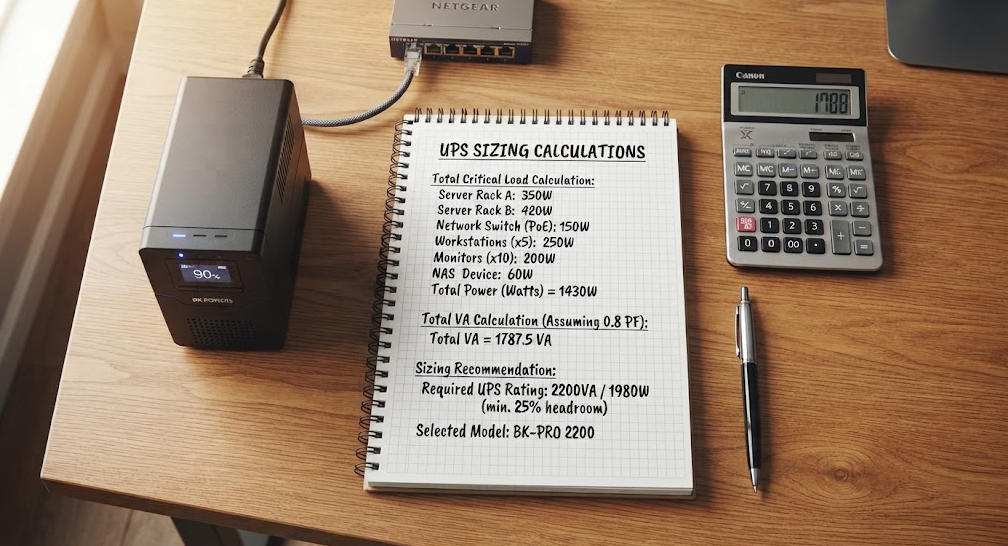
Чтобы правильно подобрать ИБП для компьютеров, выполните следующие действия. Во-первых, составьте перечень всего оборудования, которое необходимо защитить. Запишите мощность каждого устройства. Подсчитайте общую нагрузку в ваттах.
Во-вторых, переведите ватты в VA. Разделите общее количество ватт на коэффициент мощности нагрузки. Если он неизвестен, для современного оборудования используйте значение 0,90.
В-третьих, предусмотрите запас на рост. Добавьте 20–25 процентов с учетом будущего расширения. Это позволит избежать преждевременной замены.
В-четвертых, предусмотрите запас по нагрузке. Рассчитывайте систему на 70–80 процентов от номинальной мощности ИБП. Это обеспечит запас на пусковые токи и переходные процессы.
В-пятых, выберите следующий стандарт Размер UPS. Сравните номинальные значения как в кВА, так и в кВт с расчётной нагрузкой.
4. Пример таблицы для расчета размеров
| Устройство | Количество | По мощности (в ваттах) | Общая мощность (ватты) |
|---|---|---|---|
| Настольный ПК (для офиса) | 1 | 150 | 150 |
| 24-дюймовый LED-монитор | 2 | 35 | 70 |
| Wi-Fi-роутер | 1 | 15 | 15 |
| Внешний жесткий диск | 1 | 10 | 10 |
| Промежуточный итог | 245 | ||
| Корректировка коэффициента мощности (÷0,9) | 272 ВА | ||
| Маржа роста (+25%) | 340 ВА | ||
| Рекомендуемые ИБП | не менее 600 ВА / 360 Вт |
Этот пример иллюстрирует данный метод. Фактические требования зависят от конкретного оборудования. По возможности всегда измеряйте фактическое потребление мощности с помощью измерителя мощности.
Ⅴ. Технологии аккумуляторов и время автономной работы
1. Аккумуляторы VRLA и литий-ионные аккумуляторы
Аккумуляторы ИБП служат для накопления энергии на случай отключений электроэнергии. На рынке преобладают два типа аккумуляторов. Свинцово-кислотные аккумуляторы VRLA по-прежнему широко используются. Литий-ионные аккумуляторы быстро завоевывают долю рынка.
Аккумуляторы типа VRLA стоят дешевле при покупке. В нормальных условиях их срок службы составляет от 3 до 5 лет. Они чувствительны к температуре. Высокая температура окружающей среды (выше 30 градусов по Цельсию) значительно сокращает срок их службы.
Литий-ионные аккумуляторы отличаются более высокой энергетической плотностью. Срок их службы составляет от 8 до 15 лет. Они заряжаются быстрее и выдерживают более широкий диапазон температур. Их первоначальная стоимость выше. Однако с точки зрения совокупной стоимости владения литий-ионные аккумуляторы зачастую оказываются более выгодным выбором при длительном эксплуатационном сроке.
Системы управления аккумуляторами продлевают срок службы обоих типов. Зарядка с температурной компенсацией регулирует напряжение. Автоматическая диагностика позволяет на ранней стадии выявлять разряженные элементы. Эти функции входят в стандартную комплектацию качественных источников бесперебойного питания.
2. Расчет времени выполнения
Время выполнения зависит от емкость батареи и нагрузке. Основная формула позволяет получить теоретическую оценку. Умножьте напряжение аккумулятора на ампер-часы. Затем умножьте на коэффициент полезного действия. Разделите на мощность нагрузки.
Фактическое время выполнения отличается от теоретического. Емкость аккумулятора снижается при высоких скоростях разряда. Температура влияет на скорость химических реакций. С течением времени в результате старения доступная ёмкость уменьшается.
Производители публикуют графики разряда при постоянной мощности. Эти графики показывают фактическое время работы при определённых уровнях нагрузки. Инженерам следует использовать эти графики для окончательного выбора. Теоретическая формула служит лишь для предварительных расчётов.
Для компьютерных приложений требования к времени работы варьируются. Домашним пользователям требуется от 5 до 10 минут для безопасного завершения работы. В офисах может потребоваться от 15 до 30 минут. В серверных помещениях емкость аккумуляторов рассчитывается с учётом времени, необходимого для перехода на работу от генератора. Обычно это составляет от 10 до 15 минут.
3. Сравнение технологий аккумуляторов
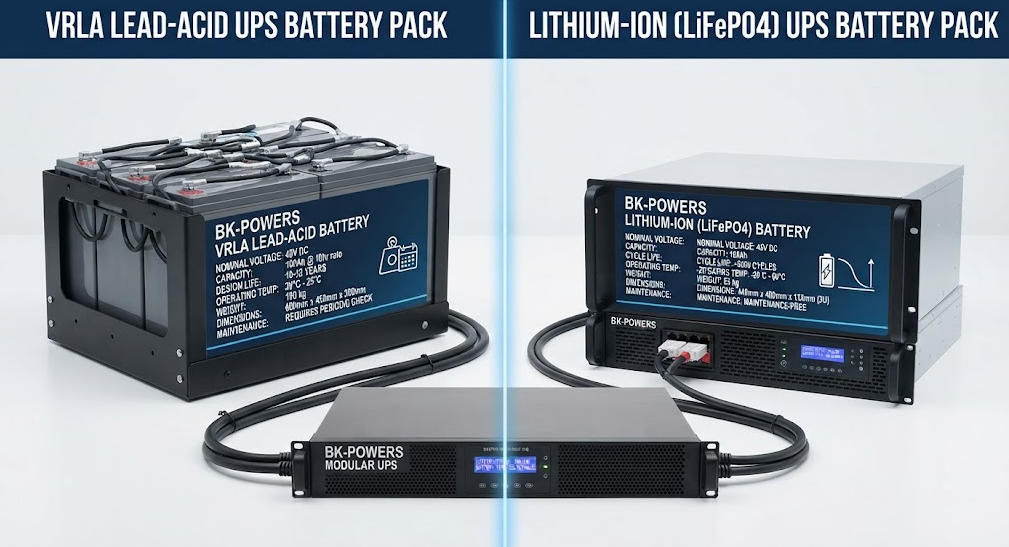
| Параметр | Свинцово-кислотные VRLA | Литий-ионный |
|---|---|---|
| Типичный срок службы | 3-5 лет | 8-15 лет |
| Плотность энергии | Нижний | в 3 раза больше |
| Время зарядки | 4–8 часов | 1-3 часа |
| Температурная чувствительность | Более 30 °C | Умеренный |
| Глубина разгрузки | 50–80% | 80–95% |
| Первоначальные затраты | Нижний | в 2–3 раза больше |
| Техническое обслуживание | Периодический осмотр | Минимум |
| Идеально подходит для | Краткосрочное резервное копирование, бюджет | Длительное время автономной работы, конфигурации премиум-класса |
Ⅵ. Форма выходного сигнала: чистая синусоида и смоделированная синусоида
1. Почему форма сигнала важна для компьютеров
Инверторы UPS выдают разное напряжение на выходе формы волны. Чистая синусоида полностью соответствует сетевому напряжению. Моделируемая синусоида использует ступенчатые приближения.
В современных компьютерах используются блоки питания с активной коррекцией мощности (PFC). Такие блоки питания требуют входного сигнала в виде чистой синусоиды. Имитированная синусоида может привести к отключению системы. Кроме того, это может вызвать перегрев или ненормальный шум вентилятора.
Компания Eaton считает, что чистая синусоидальная волна является обязательным условием для серверов с функцией коррекции мощности (PFC). Ровная форма волны позволяет удерживать уровень гармонических искажений на уровне ниже 5 процентов. Имитированные волны создают риски несовместимости для чувствительной электроники.
Разница видна на осциллографе. Чистая синусоида имеет плавные кривые. Моделируемая волна имеет прямоугольные скачки. Эти скачки содержат высокочастотные гармоники. Гармоники создают нагрузку на конденсаторы и трансформаторы.
2. Руководство по совместимости
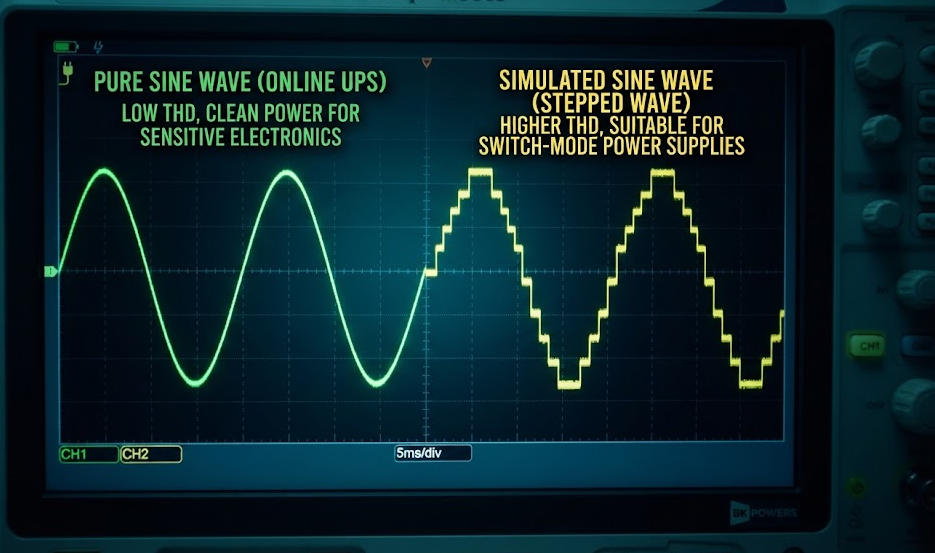
ИБП с чистой синусоидальной волной подходят для всех типов компьютеров. Они совместимы с игровыми ПК, рабочими станциями и серверами. Они устраняют электромагнитные помехи, которые приводят к искажению передаваемых данных.
Для простых маршрутизаторов достаточно устройств с имитацией синусоидальной волны. Они также подходят для питания настольных компьютеров без PFC. Однако при их использовании существует риск повреждения блоков питания с активной системой PFC. Разница в цене между этими двумя типами уменьшилась. Большинству пользователей компьютеров следует выбирать устройства с чистой синусоидой.
Игровые ПК с видеокартами высокой мощности нуждаются в чистой синусоидальной волне. Блок питания потребляет высокий пусковой ток. Имитированные формы сигнала не способны удовлетворить эту потребность. Такие же требования предъявляются к рабочим станциям с профессиональными видеокартами.
Ⅶ. ИБП или стабилизатор напряжения для компьютеров
1. Фундаментальные различия
ИБП обеспечивает резервное питание во время отключений электроэнергии. A стабилизатор напряжения регулирует только напряжение. Он не может обеспечивать питание оборудования во время отключений электроэнергии.
ИБП может быть оснащён функцией регулирования напряжения. Наличие этой функции зависит от топологии устройства. Эту функцию поддерживают устройства линейно-интерактивного и онлайн-типа. Устройства резервного типа не поддерживают эту функцию.
Напряжение стабилизаторы используют сервомоторы или модули на тиристорах. Они плавно регулируют выходное напряжение. Время их отклика составляет от 10 до 100 миллисекунд. Это медленнее, чем коммутация в ИБП, но вполне достаточно для коррекции напряжения.
2. Когда использовать каждое устройство
Компьютерам, расположенным в районах с частыми перебоями в электроснабжении, необходим ИБП. Резервное питание предотвращает потерю данных. Кроме того, оно обеспечивает безопасное выключение оборудования.
Компьютерам, установленным в районах со стабильным электроснабжением, но с сильными колебаниями напряжения, может потребоваться стабилизатор. Однако для большинства пользователей компьютеров ИБП приносит больше пользы. Функция резервного питания позволяет устранить наиболее серьёзный риск.
В некоторых установках используются оба устройства. Стабилизатор устанавливается на входе, а ИБП — на выходе. Такая архитектура обеспечивает комплексную защиту. Кроме того, она расширяет аккумулятор UPS жизнь за счет снижения напряжения.
Ⅷ. Выбор подходящего ИБП для вашего компьютера
1. Домашние и настольные ПК
Домашние офисные системы обычно потребляют от 200 до 400 ватт. Для большинства пользователей подойдет линейно-интерактивный ИБП мощностью от 600 до 1000 ВА. Он обеспечивает время автономной работы от 10 до 30 минут.
Для современных настольных компьютеров выбирайте выход с чистой синусоидальной волной. Убедитесь, что в ИБП достаточно розеток с аккумуляторным питанием. Подключайте мониторы и маршрутизаторы к защищенным портам. Лазерные принтеры подключайте только к розеткам с защитой от скачков напряжения.
Обратите внимание на порты мониторинга USB. Они обеспечивают работу программного обеспечения для автоматического выключения. Это программное обеспечение корректно закрывает приложения. Кроме того, оно отключает питание системы до того, как разрядится аккумулятор.
2. Игровые ПК и рабочие станции
Игровые ПК требуют большей мощности. Системы среднего уровня потребляют от 400 до 550 ватт. Мощность высокопроизводительных систем с дискретными видеокартами может превышать 600 ватт.
Выберите ИБП линейно-интерактивного или онлайн-типа мощностью от 1000 до 1500 ВА. Для источников питания с активной коррекцией коэффициента мощности (PFC) обязательным условием является наличие чистой синусоидальной волны. Время автономной работы при полной нагрузке может сократиться до 5–15 минут. Для увеличения времени автономной работы рекомендуется использовать дополнительные аккумуляторные батареи.
ЖК-дисплеи позволяют контролировать уровень заряда. На них отображаются входное напряжение, состояние аккумулятора и оставшееся время работы. Такая наглядность позволяет избежать неожиданных отключений во время игровых сессий.
3. Серверы и оборудование центров обработки данных
Для серверов требуются сетевые ИБП с двойным преобразованием. Эти устройства обеспечивают полную изоляцию. Кроме того, они обеспечивают точное регулирование напряжения.
Рассчитывайте мощность ИБП с учетом номинальных значений как в кВт, так и в кВА. Для критически важных приложений применяйте схему резервирования N+1. Синхронизируйте время автономной работы с последовательностью запуска генератора. Согласно стандарту IEC 62040-3 эти устройства относятся к топологии VFI.
ИБП для монтажа в стойку позволяют сэкономить площадь. Они устанавливаются в стандартные 19-дюймовые шкафы. Модульная конструкция позволяет увеличить мощность. Модули с возможностью «горячей» замены обеспечивают проведение технического обслуживания без простоев.
Ⅸ. Стандарты и соблюдение требований
1. Серия стандартов МЭК 62040
Стандарт IEC 62040-1 посвящён требованиям безопасности к источникам бесперебойного питания (ИБП). Он охватывает меры по предотвращению опасностей и конструктивные нормы. Стандарт IEC 62040-3 определяет эксплуатационные характеристики и методы испытаний. В нём топологии классифицируются как VFD, VI или VFI.
Аббревиатура VFD означает «зависимый от напряжения и частоты». К этому классу относятся резервные ИБП. Аббревиатура VI означает «независимый от напряжения». К этому классу относятся модели с интерактивным режимом работы. Аббревиатура VFI означает «независимый от напряжения и частоты». К этому классу относятся системы с двойным преобразованием в режиме онлайн.
Соответствие стандарту IEC 62040-3 обеспечивает подтвержденные эксплуатационные характеристики. Оно гарантирует соблюдение предельных значений времени передачи, регулирования напряжения и коэффициента нелинейных искажений (THD). Покупателям следует запрашивать у производителей протоколы испытаний.
2. UL 1778 и региональные сертификаты
Стандарт UL 1778 определяет требования безопасности для систем бесперебойного питания (ИБП) в Северной Америке. Он охватывает вопросы электробезопасности и противопожарной защиты. Маркировка CE применяется на европейских рынках. Она предполагает соблюдение требований Директивы о низковольтных устройствах.
Перед покупкой всегда проверяйте знаки сертификации. Несертифицированные устройства могут не обеспечивать надлежащую защиту. Кроме того, они могут не соответствовать местным электротехническим нормам.
Сертифицированные устройства проходят термические испытания. Кроме того, они выдерживают испытания на диэлектрическую прочность. Эти процедуры обеспечивают безопасную работу в условиях неисправностей. Ни в коем случае не устанавливайте несертифицированные ИБП в коммерческих помещениях.
Ⅹ. Заключение
ИБП для компьютеров является важнейшим элементом инфраструктуры. Он обеспечивает защиту от отключений электроэнергии, провалов напряжения, скачков напряжения и электромагнитных помех. Выбор подходящей топологии зависит от степени критичности вашей нагрузки. Устройства резервного питания подходят для базового домашнего использования. Модели с линейно-интерактивным режимом работы обеспечивают оптимальный баланс между стоимостью и уровнем защиты. Системы с двойным преобразованием в режиме онлайн предназначены для серверов, выполняющих критически важные задачи.
Для правильного подбора мощности необходимо точное измерение нагрузки. Преобразуйте ватты в VA с учетом коэффициента мощности. Учитывайте запас на рост и нагрузку. Для современных компьютеров выбирайте выход с чистой синусоидальной волной. Выбирайте аккумуляторы VRLA или литий-ионные в зависимости от требуемого времени автономной работы и бюджета.
Рассматривайте ИБП как часть более широкой архитектуры системы электропитания. Согласуйте его работу с устройствами защиты от перенапряжений, заземлением и генераторами. Такой подход обеспечит долгосрочную надежность вашего цифрового оборудования.
Сбор сопутствующей информации
| Название | Основное содержание | URL |
|---|---|---|
| Для чего нужен источник бесперебойного питания? | Общие функции, компоненты и принципы работы ИБП для всех областей применения | https://bkpowers.com/service/what-does-ups-do/ |
| Что такое ИБП в компьютерной системе? | Определение и значение ИБП, в частности, для компьютерных систем | https://bkpowers.com/service/what-is-ups-in-computer-system/ |
| Калькулятор времени автономной работы UPS | Методика расчета времени автономной работы и управление нагрузкой для систем ИБП | https://bkpowers.com/service/ups-backup-time-calculator/ |
| Расчет времени автономной работы аккумуляторной батареи для промышленных ИБП | Подробные формулы расчета времени автономной работы от аккумулятора и настройка для различных сценариев | https://bkpowers.com/service/battery-backup-time-calculation-for-ups/ |
| Как работают промышленные системы бесперебойного питания (ИБП) | Подробное изучение принципов работы выпрямителя, инвертора, аккумулятора и режима байпаса | https://bkpowers.com/service/how-industrial-ups-systems-work/ |
| Понимание технических характеристик промышленных источников бесперебойного питания (ИБП) | Диапазон входного напряжения, КПД и промышленные стандарты на ИБП | https://bkpowers.com/service/understanding-industrial-power-ups-specifications-guide/ |
| Что такое Промышленные частотные ИБП? | Технические различия между ИБП на основе трансформатора и высокочастотными ИБП | https://bkpowers.com/service/what-is-an-industrial-frequency-ups/ |
| Что означает аббревиатура UPS? | Определение UPS, принципы работы и сравнение топологий | https://bkpowers.com/service/what-does-ups-stand-for/ |
| Что такое ИБП? Откройте для себя возможности источника бесперебойного питания | Подробное руководство по типам ИБП: автономные, линейно-интерактивные и онлайн-ИБП | https://bkpowers.com/service/what-is-ups-and-how-it-works/ |
| Анализ соотношения затрат и выгод: UPS против стабилизаторов напряжения | Сравнение стоимости, эффективности и рентабельности инвестиций (ROI) между ИБП и стабилизаторами напряжения | https://bkpowers.com/service/ups-vs-voltage-stabilizers-cost/ |
Источники информации
| Название | Основное содержание | URL |
|---|---|---|
| IEEE — Источники бесперебойного питания | Технические определения, стандарты бесперебойного электропитания и архитектура компонентов ИБП | https://www.ieee.org/ |
| IEC 62040-1 — Требования безопасности к источникам бесперебойного питания (ИБП) | Международные требования к безопасности систем бесперебойного питания | https://webstore.iec.ch/publication/66912 |
| IEC 62040-3 — Характеристики и испытания источников бесперебойного питания (ИБП) | Классификация по производительности (VFD/VI/VFI), методы испытаний и контрольные показатели эффективности | https://webstore.iec.ch/publication/66913 |
| Министерство энергетики США — энергоэффективные источники бесперебойного питания (ИБП) | Рекомендации по повышению эффективности системы бесперебойного питания (UPS), оптимизация нагрузки и модульный ИБП рекомендации | https://www.energy.gov/ |
| UL Solutions — Стандарт UL 1778 для источников бесперебойного питания (ИБП) | Система сертификации безопасности систем бесперебойного питания в Северной Америке | https://www.ul.com/ |
ЧАСТО ЗАДАВАЕМЫЕ ВОПРОСЫ
Вопрос 1: Какой мощности ИБП мне нужен для моего компьютера?
Прямой ответ: Чтобы определить необходимую мощность ИБП, сложите мощность всего оборудования в ваттах, разделите полученное значение на коэффициент мощности и добавьте запас мощности 25%. Техническое пояснение: Для большинства домашних офисов требуется мощность 600–1000 ВА. Для игровых ПК требуется мощность 1000–1500 ВА. Для серверов требуются устройства с постоянным питанием и резервированием по схеме N+1. Практическое применение: Используйте измеритель мощности для определения фактического потребления энергии. Ни в коем случае не полагайтесь исключительно на номинальные значения, указанные на заводской табличке.
Вопрос 2: В чём разница между VA и ваттами?
Прямой ответ: VA — это кажущаяся мощность. Ватты — это активная мощность. Коэффициент мощности связывает их между собой. Техническое пояснение: Формула выглядит следующим образом: VA = Вт ÷ PF. У современных компьютеров коэффициент мощности (PF) составляет около 0,9–0,99. ИБП должен превышать оба этих значения. Практическое применение: При выборе ИБП обратите внимание на оба показателя. Устройства серии Unity-PF упрощают подбор.
Вопрос 3: Как долго ИБП обеспечит работу моего компьютера?
Прямой ответ: Время автономной работы зависит от емкости аккумулятора и нагрузки. Типичный бытовой ИБП обеспечивает 10–30 минут автономной работы. Техническое пояснение: Производители публикуют графики разряда при постоянной мощности. Высокие скорости разряда снижают полезную ёмкость. Практическое применение: Выберите время в зависимости от поставленной цели. На выключение уйдет 5–10 минут. На переходный режим генератора — 15–30 минут.
Вопрос 4: Нужна ли для моего компьютера чистая синусоида?
Прямой ответ: Да, если ваш компьютер оснащен блоком питания с активным PFC. Такими оснащены большинство современных настольных компьютеров и все серверы. Техническое пояснение: Имитированные синусоидальные волны могут привести к отключению оборудования или его перегреву. Чистая синусоидальная волна обеспечивает коэффициент нелинейных искажений (THD) ниже 5%. Практическое применение: Для игровых ПК и рабочих станций выбирайте чистую синусоидальную волну. Имитированная волна подходит только для простых маршрутизаторов.
Вопрос 5: Может ли ИБП заменить стабилизатор напряжения?
Прямой ответ: ИБП обеспечивает резервное питание. Стабилизатор же лишь регулирует напряжение. Они выполняют разные функции. Техническое пояснение: ИБП линейно-интерактивного и онлайн-типа оснащены авторегулятором напряжения (AVR). ИБП резервного типа не оснащены таким устройством. В некоторых конфигурациях используются оба типа устройств. Практическое применение: Если у вас часто происходят отключения электроэнергии, приобретите ИБП. Если напряжение колеблется, но подача электроэнергии стабильна, может помочь стабилизатор напряжения.